Just as everyone has their own unique financial goals and circumstances, so does every relationship. But when people pair up, money complications tend to multiply.
This is true even in happy, secure relationships, where both people talk about money with their partner, share financial values, and generally agree on their financial goals.
Many of Tiller’s customers use the service to manage shared finances
That’s because Google Sheets and Excel are amazingly powerful collaboration tools. They’re secure, easy to share, and support working together in real-time. (Plus you can easily roll back changes if someone breaks something.)
And because spreadsheets are so flexible, you can easily customize them to your exact needs as a couple. You can share everything, share a few things, or keep everything separate.
Some combine everything, some divide everything, but most are somewhere in between. They might share a joint account, but also use their own account and credit cards. Or they may split some expenses and share others.
Some are planning to get married, while others are navigating shared childcare expenses after separation.
We also hear from parents managing their children’s finances, children managing their parent’s finances, and business partners, financial planners, and accountants trying to keep in sync with each other and their clients.
With so many different ways to manage shared finances, and so many ways to use spreadsheets powered by Tiller, we thought we’d share a few common scenarios from sharing everything, to keeping everything separate.
Note: Read the basics of setting up Tiller to manage money as a couple in this post:
1. Sharing all finances and tracking everything in one spreadsheet

At least from a workflow perspective, this is the easiest way to share finances.
Once you’ve chosen how you want to log into Tiller (via personal email address or a shared email address) and connected all desired accounts you want to track, you will create one spreadsheet and link those accounts to it.
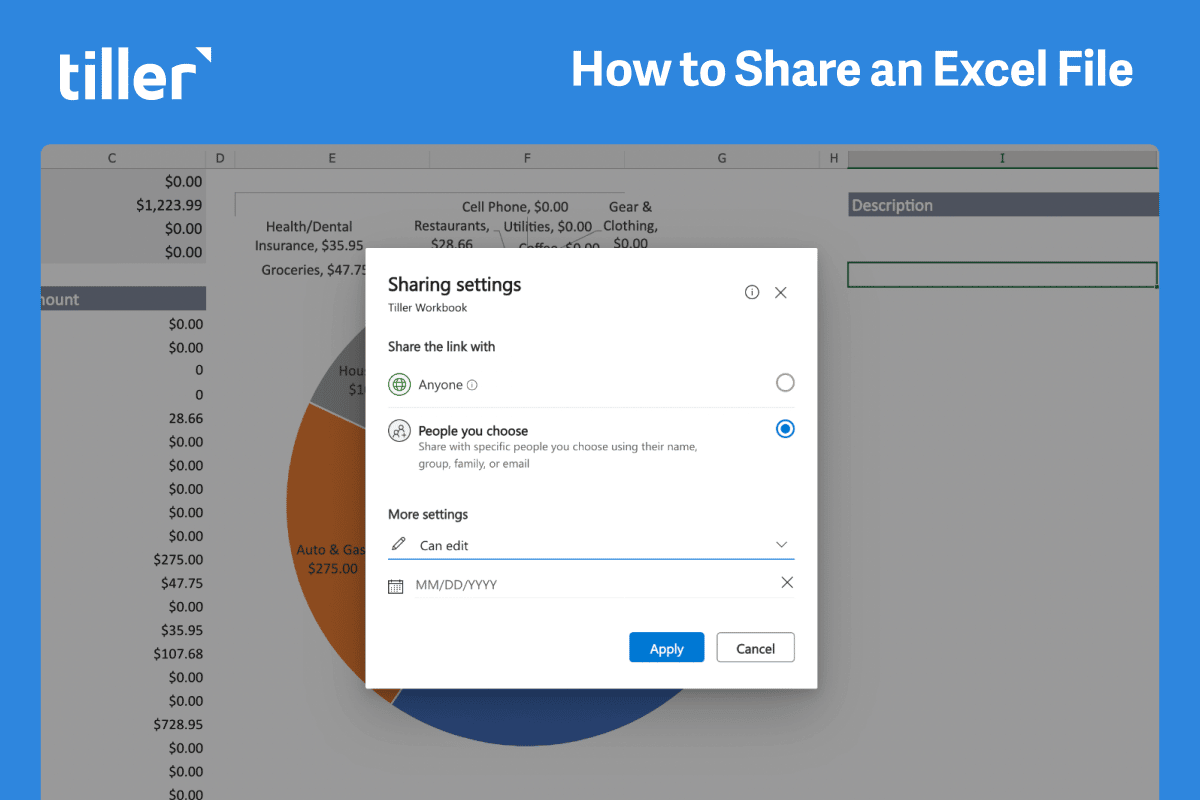
Set spreadsheet sharing permissions as outlined here:
When you’re thinking about all of your accounts as “ours,” there’s no need to set up a structure to assign expenses to each partner.
Instead, we recommend starting simple. Using the sample categories in the Categories sheet as a starting point, you can add new categories to the bottom of the list. You can edit the names of any sample categories.
Remember you can always make adjustments to your category and group structure later.
2. Splitting and assigning shared and individual expenses in a shared spreadsheet
When you have some individual accounts and expenses, plus some shared accounts or expenses, it’s still possible to track it all in one spreadsheet.
Category considerations in a shared spreadsheet
If you track shared expenses in a shared Tiller spreadsheet, consider how you set up your Categories sheet (more on Categories here in the Foundations Guide).
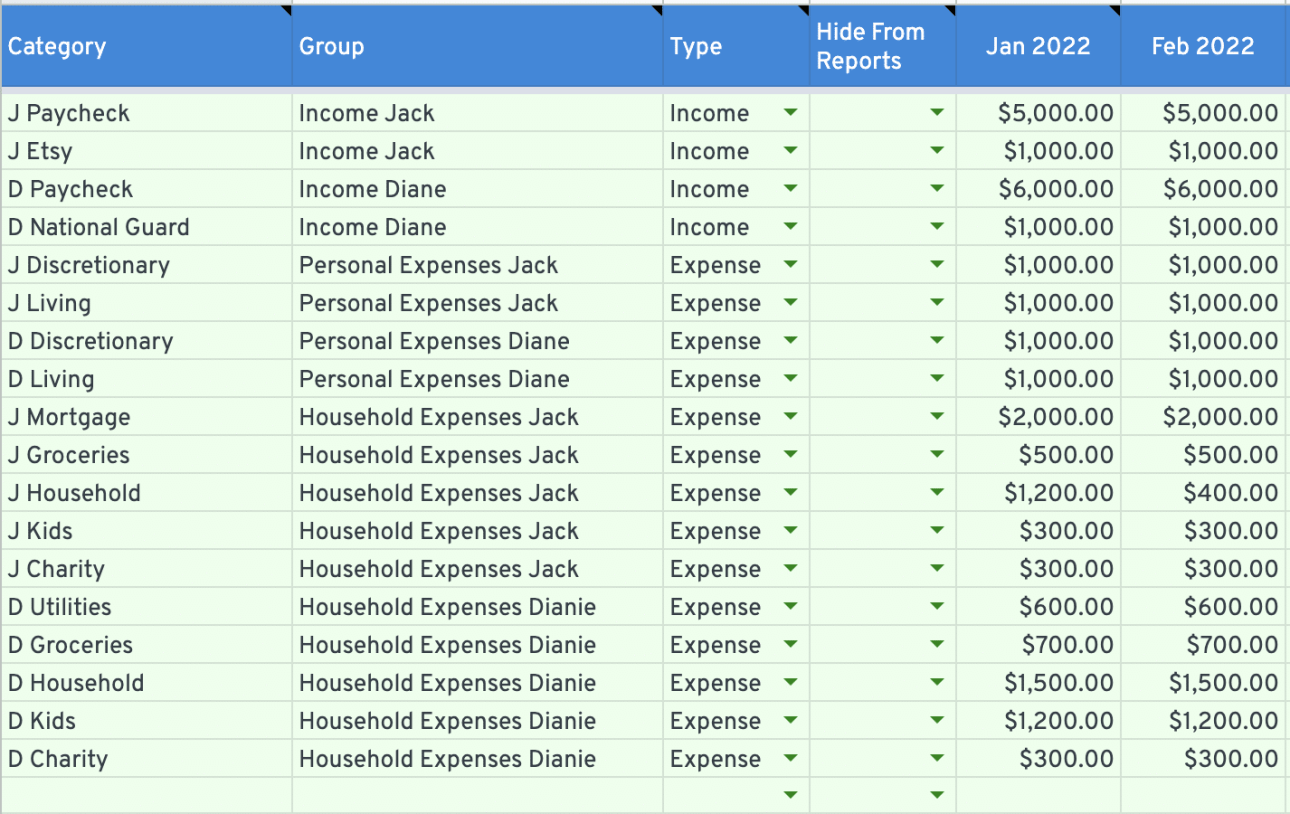
The example category structure below outlines one way you might set up your categories when you share household expenses with a spouse or partner:
- Partner 1 income
- Partner 2 income
- Partner 1 expenses
- Partner 2 expenses
- Shared expenses paid by partner 1
- Shared expenses paid by partner 2
In the example below we use the first initial in the Category name to differentiate between categories because every category name must be unique, but both individuals likely have the same types of expenses:
Now that you’ve made these initial decisions on structuring your Tiller account and categories, we’ll share some common workflows for shared Tiller accounts.
Even with the customization possibilities of Tiller, there may still be cases where it makes sense to have more than one spreadsheet.
When does it make sense to use two separate spreadsheets for a joint household budget and individual budget?
Some couples maintain separate finances while also keeping a joint account for shared expenses, like household costs or expenses related to kids.
In this circumstance, you can use Tiller to manage your own accounts and individual expenses in one spreadsheet, while keeping another shared spreadsheet to budget and track all joint household expenses.
For example, if you want big picture visibility of your progress Household budget, without any interference from individual expenses, that would be a case where using more than one spreadsheet makes sense.
In the Foundation Template, the Monthly Budget and Yearly Budget sheet budget calculations are based on the budget values of categories in the spreadsheet and transaction amounts from the Transactions sheet. There’s not a way to run two separate budget plans in the same spreadsheet.
3. Keeping completely separate yet completely transparent finances
When you decide to keep your finances completely separate, you can still openly share smaller details like transaction history and savings rate.
Some couples want this autonomy, but also want to view exact numbers as they independently manage their own money to work toward collective goals.
If you decide this is the best system for you, you can simply change your categories to denote whether they belong to partner one or partner two. Then, after your accounts are linked, Tiller can help you create a spreadsheet like this one:
4. View-only finances
In some situations you may want to allow someone, like a financial advisor, to view the financial data in your spreadsheet without allowing them any editing access.
In these situations, you can simply share your spreadsheet, making sure to choose the appropriate permissions you want to grant to that person.
In both Google Sheets and Excel, you can share your spreadsheet and set view-only permissions.
5. Tracking shared financial goals, such as savings or debt payoff
Common ways to track savings goals with Tiller: create a savings line in your budget to help you reach your savings goals
When you’re working toward shared savings goals in the Tiller Foundation Template, there are a few tactics inside the template you can use to set yourselves up to make progress and meet those goals.
For example, if you have a shared goal to save $12,000 this year, you can make it part of your planned monthly budget. On the Categories sheet, create an expense category for Savings and add a monthly budget value of $1,000. If you expect a holiday bonus or another irregular income month where you’ll have more funds to contribute toward savings, you can plan ahead and set the budget value to a higher amount for that month only.
A note about transfers
If your checking and savings accounts are linked to your spreadsheet and you’re NOT setting a budget for your savings contributions, we typically recommend categorizing the withdrawal from your checking account and deposit to your savings account as a Transfer.
That will create a record of the money moving from one account to another.
However, if savings contributions are a line item in your budget, then you’ll need to categorize the debit transaction (where money is leaving the account) to your Savings expense category. That will ensure it’s included in the calculations for your budget. In the Foundation Template, transfers are not included in budget calculations.
You may be wondering how to categorize the other transaction associated with your transfer to savings, the deposit, or credit to your savings account. On the Categories sheet, create a separate Savings category, set the Type to Income, and select the “Hide from Reports” option for the category. This will prevent your savings contribution from being counted as budgetable income in your monthly budget.
Consider creative ways to build off the data in your spreadsheet, like using IMPORTRANGE to pull your data into a shared Goal Tracking sheet.
Another way to track savings goals with Tiller: try a template or workflow from the Tiller Community
The Tiller Community is a resource where you can find advice on customized projects based on the Tiller Foundation Template.
If you’re using Google Sheets, you can install the Savings Budget into your Foundation Template spreadsheet via the Tiller Community Solutions add-on.
Or try the Debt Planner to help devise a debt payoff strategy as a couple. Detail the outstanding balances, interest rates, and minimum payments, and establish your strategy for tackling the debt together or individually.
Regular Financial Check-ins
Schedule periodic financial check-ins to review your spreadsheets and assess your progress toward your goals. These meetings can help maintain financial transparency, address any concerns, and make necessary adjustments to your plans.
Managing separate finances as a married couple doesn’t have to be daunting.
With the help of spreadsheets, you can maintain financial independence while ensuring transparency and organization in your financial life.
By creating individual budgets, tracking joint expenses, setting financial goals, managing debt, and scheduling regular financial check-ins, you and your partner can confidently navigate the world of separate finances and work together to keep in sync and achieve your financial goals.