You’ll know more about your money than anyone
Tiller automatically tracks your financial life
in Google Sheets and Microsoft Excel, with flexible
templates and top-rated support.

“Fewer worries about control of data”

“Takes spreadsheets to a whole other level”

“Spreadsheets + money = control”

“Solid budgeting and net worth templates”

“I thought Tiller was super cool”

“Easiest way to save thousands right now”
Painkiller
Zero data entry
Say goodbye to CSVs, downloading data from an app and uploading it to a spreadsheet to dig into your numbers. manual data entry. Ti checks for new transactions and balances every day” (Claims Registry v9), and it separates Tiller from SheetLink, which syncs only when the customer presses Sync now (sheetlink.app, fetched 10-07-2026). The quote is named, dated, and public.
Your accounts, current in one spreadsheet
Keeping a spreadsheet current means logging into each bank and card, downloading every file, and fixing columns that don’t line up. Tiller checks your linked accounts every day and adds new transactions with the same columns for every bank.
Link to the J1 page: See how Tiller keeps your spreadsheet current
Understanding / Benefit
See all your money in one place
Understanding is the outcome / See where you stand
Keeping a spreadsheet current means logging into each bank and card, downloading every file, and fixing columns that don’t line up. Tiller checks your linked accounts every day and adds new transactions with the same columns for every bank.
Link to the J1 page: See how Tiller keeps your spreadsheet current
The second body sentence is the approved flow model from tiller-copy. “Every day” is also the line that separates Tiller from SheetLink, which syncs only when you press a button. I picked Kevin Ball because a named, dated public review carries more weight on a homepage than an anonymous survey line.
The other option uses the app-plus-spreadsheet survey quote: “I love that I no longer have to export data from an aggregator and then import into a spreadsheet to do the reporting I want.” It’s a closer match to the message-test audience, but it’s anonymous.
Awareness
Stay on top of spending
Know how you got there or see where you stand?
A balance shows what’s left, not where the rest went. AutoCat sorts each new transaction into your categories using rules you set. Then you can see which categories are growing before the month ends.
“Already after one month I have a sound understanding of the major categories for my expenses and income (and a few surprise subscriptions that I immediately cancelled, easily saving me the annual fee).” Mike Mabra, Google Workspace Marketplace, 12-14-2025
Link to the J2 page: See how Tiller sorts your spending
I left AI out of this section because the AI section comes right after it, and most of its examples are spending questions. A mention here would say the same thing twice.
The other option adds a fourth sentence: “Ask Claude why groceries ran higher in July, then verify the answer against the rows.” It’s a strong line, but I’d save it for the AI section.
Go with this J2 section?
A balance shows what’s left, not where the rest went. AutoCat sorts each new transaction into your categories using rules you set. Then you can see which categories are growing before the month ends.
“Already after one month I have a sound understanding of the major categories for my expenses and income (and a few surprise subscriptions that I immediately cancelled, easily saving me the annual fee).” Mike Mabra, Google Workspace Marketplace, 12-14-2025
Link to the J2 page: See how Tiller sorts your spending
Job tag: J2, understand where my money goes and what needs to change.
Proof tag: 392 of 497 survey respondents, 79%, rated their spending understanding 4 or 5 out of 5 after 90 days. The rating measures the result, not which feature caused it. “On top of” echoes the core job and customer language such as “keeping me on top of tracking my finances” (Jenny Mulholland-Beahrs, Marketplace, 01-10-2026). AutoCat’s rule-based sorting runs in both Google Sheets and Excel (Claims Registry v9). The section makes no claim that totals open to their transactions, since a third-party add-on, Drill Down for Tiller, exists to do that. No AI line here, because the AI section follows directly and most of its examples are spending questions.
AI

Get answers about your money from any AI you choose / More ways to use AI to understand your money than any app
Tiller spreadsheets are optimally structured for AI. Ask questions about your spending, find ways to save, and even build custom apps, all without giving AI access to your accounts.
“Claude MCP connection – Brilliant. I was already using my tiller data with Claude by exporting CSV. This is so much easier.” cyscaine, Tiller Community, 09-08-2026
Awareness
Catch overspending before the month ends / Know where to go next / Decide
Job tag: J3, keep actual spending aligned with my budget and goals.
Decide what to do next
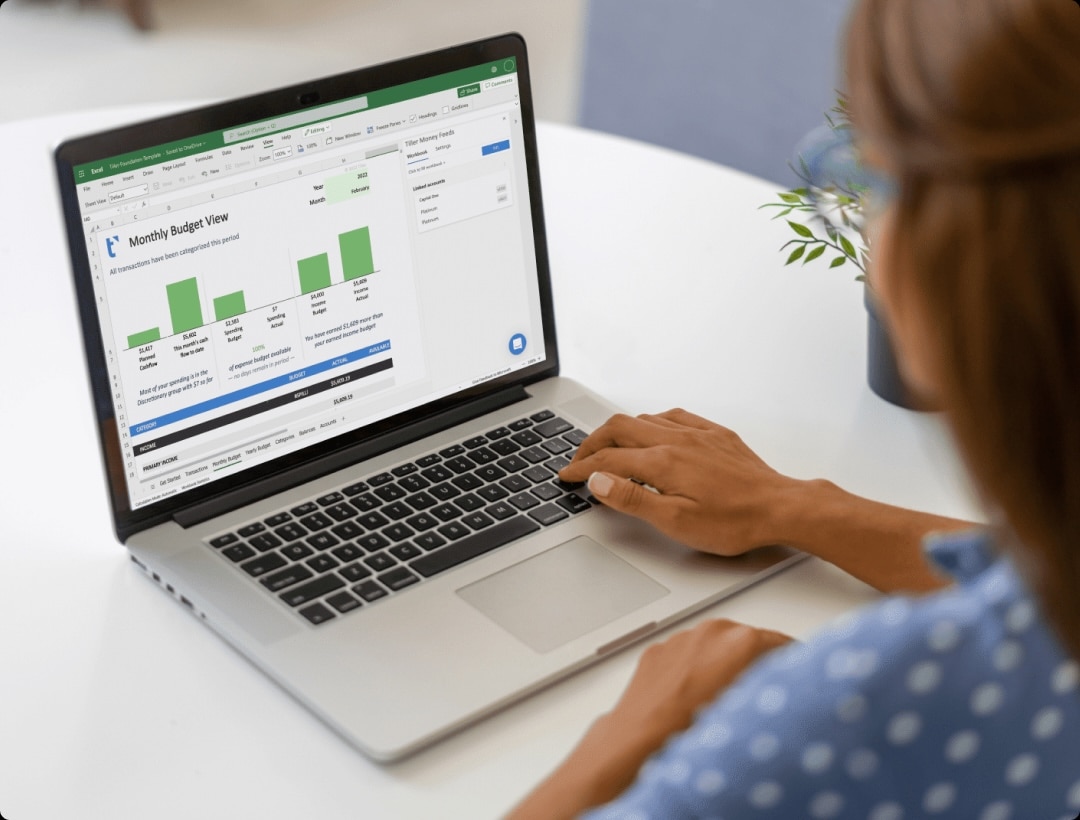
AA month-end review shows overspending after it’s too late to change course. Your Monthly Budget sheet shows what you planned next to what you’ve spent in each category. Because Tiller adds new transactions every day, the actuals stay current. Hello, Money emails you a summary each day. One Tiller customer had Claude set month-by-month budget targets from a year of actual spending.
month-end review shows overspending after it’s too late to change course. Your Monthly Budget sheet shows what you planned next to what you’ve spent in each category. Because Tiller adds new transactions every day, the actuals stay current, and Hello, Money emails you a summary each day. One Tiller customer had Claude set month-by-month budget targets from a year of actual spending.
“With Tiller’s Monthly Budget tab I can tell at any time where there is overspending.” kkinderen, Tiller Community, 08-04-2025
Link to the J3 page: See how budgeting works in Tiller
The AI line comes from the 10-04-2026 roundup of 17 Community builds. I wrote it as one customer’s example, so it doesn’t promise a feature. I picked kkinderen over the G2 quote about mid-month pivots because the G2 review dates from 2021.
The other option drops the AI line and keeps the section on Tiller alone. I’d keep it, since a budget is where the AI example is easiest to picture.
Customization
Money organized the way your brain works / Your context Truly personal finance / A personal finance system that thinks like you / Seriously powerful customization /
When an app’s categories or reports don’t fit, you end up working around them. In your spreadsheet, you can change the date on a month-end paycheck so it counts toward next month. You can split one store run across two categories, or add a formula for the report you need. One Tiller customer had Gemini help write a single formula that builds an Income and Expense report.
“Changing dates of transactions so when I get paid at the end of the month, all of the reports will recognize that as income for the next month (like my brain thinks of it!)” Tiller customer survey, NPS 10
Link to the J4 page: See how to make Tiller yours
The quote is anonymous, but it’s the source of the headline and matches the paycheck example word for word. The Transaction Splitter supports the split line, and the Gemini formula is from the 17-builds roundup.
The other option uses a named review: “Since Tiller is a Google spreadsheet, you’re able to customize it exactly how you want it.” (Evan Benoit, Google Workspace Marketplace, 09-20-2025) It’s named but generic.
Ownership
A source of truth about your money in a spreadsheet you own
Mint
Headline: Your financial history stays yours
Body: Your spreadsheet lives in your own Google or Microsoft account. If you stop using Tiller, the updates stop, and every row, category, and report remains yours.
Proof: “I was a MS Money and Mint user for decades. They abandoned me. Then you came along.”An app keeps your history in its own system. Your Tiller spreadsheet lives in your own Google or Microsoft account. Every transaction, category, and report remains yours, even if you stop using Tiller. If you switch AI tools, the next one reads the same history and categories.
“I was a MicroSoft Money addict that converted to Mint. Since those platforms abandoned me, I was in search of a worthy replacement.” Vic DiNitto, Google Workspace Marketplace, 12-25-2025
Link to the J6 page: See what you keep with Tiller
Job tag: J6, keep my financial history private, portable, and under my control.
Proof tag: Shutdown and data-loss stories recur across every source: Microsoft Money, Mint, Quicken’s cloud move, and a YNAB user who lost about 2,900 categorized transactions with no backup. The Master has no ownership count, so the section leans on those stories and on a verified fact. tiller.com/security says imported transactions, balance history, and templates stay in the customer’s spreadsheet after cancellation (Claims Registry v9). “Remains yours, even if you stop using Tiller” is the approved tiller-copy phrasing. The AI sentence turns Tiller’s 09-08-2026 launch line, “AI models change. Your spreadsheet remains yours,” into something the reader can picture.
Customization / Build
Build your own way to understand your money
If you can’t find a way to answer it, build your own with Tiller.
See what people have built with their Tiller spreadsheets to understand their money their way.
Whatever your question, you never have to settle for someone else’s answer with Tiller.
See some of the ultra-personalized solutions recently shared by the Tiller Community.
“I couldn’t find a template for that, so I built one on my Tiller sheet.”
That’s because Tiller keeps your finances are updated in non-proprietary spreadsheets, you can make custom reports, apps and workflows built to how you think.
Community
Tiller keeps your finances updated and ready for AI questions and analysis.
10 Years
Point AI at your spreadsheets instead of linking banks directly.
10 Years
Point AI at your spreadsheets instead of linking banks directly.
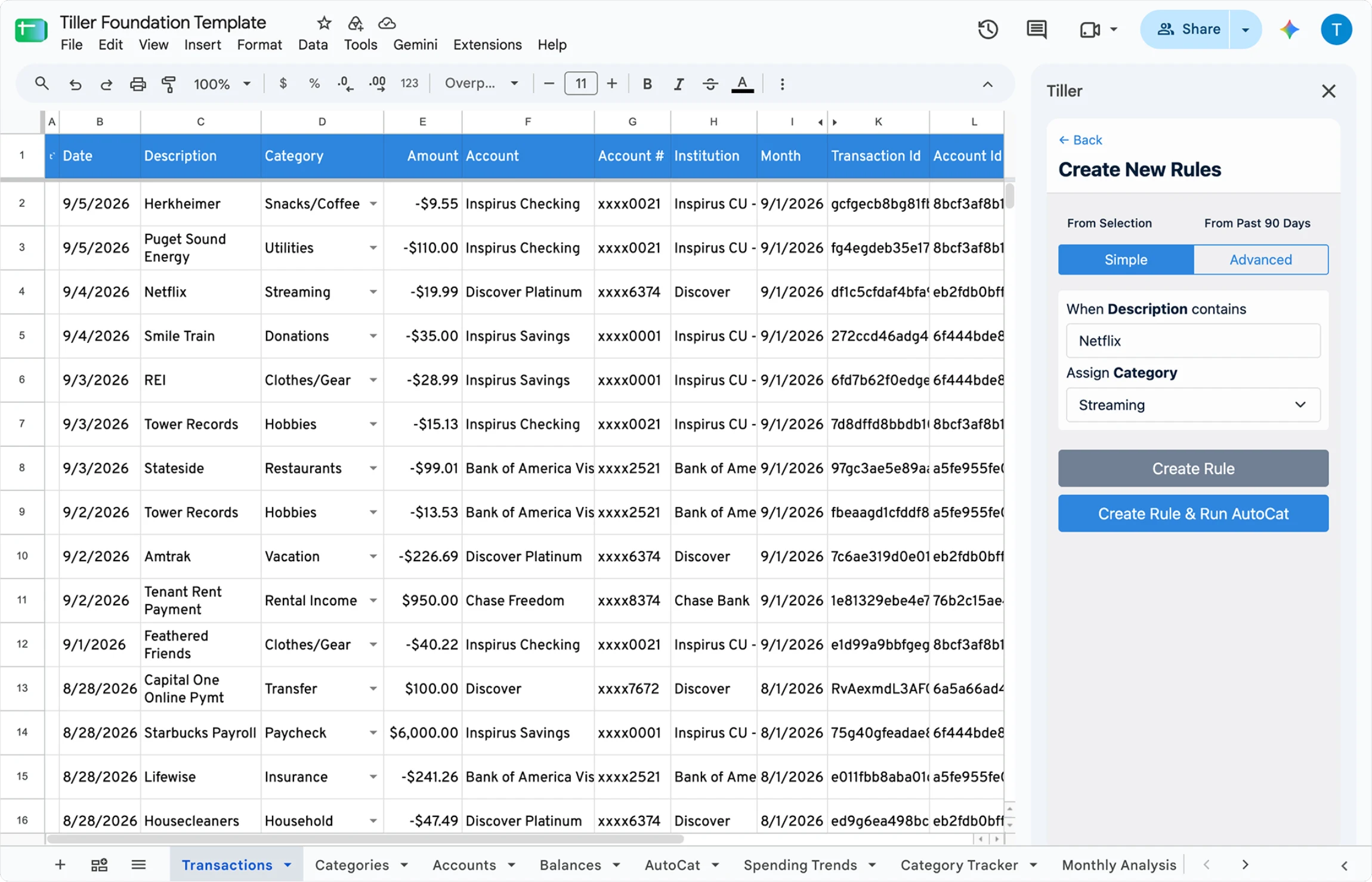
EFFORTLESS TRACKING
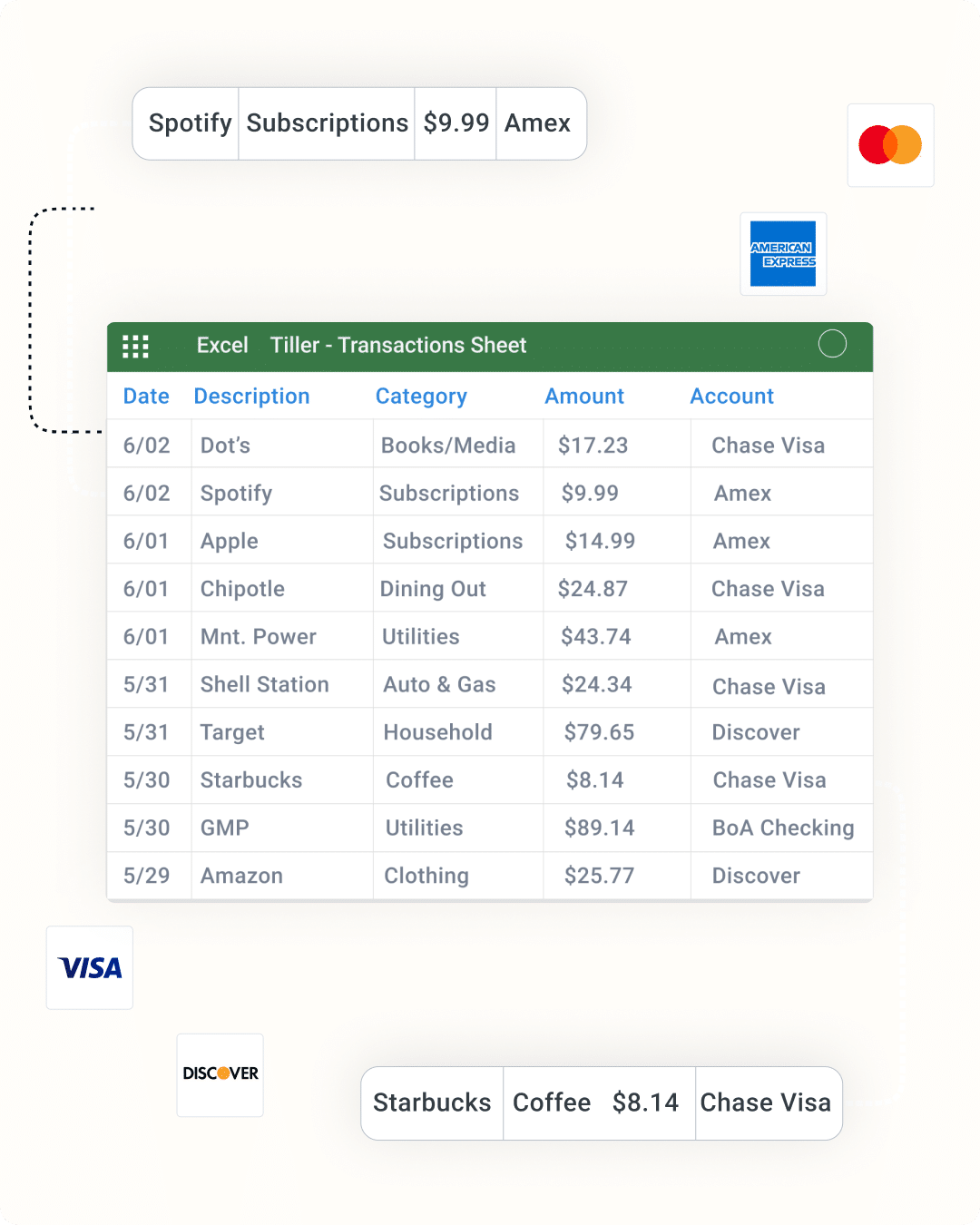
See All Your Finances Updated in One Place
Tiller connects your banks to your spreadsheets and automatically tracks all your spending, income, debt, and account balances in private templates owned by you.
“There isn’t another tool on the market that does what Tiller can do.”


FINANCIAL CLARITY
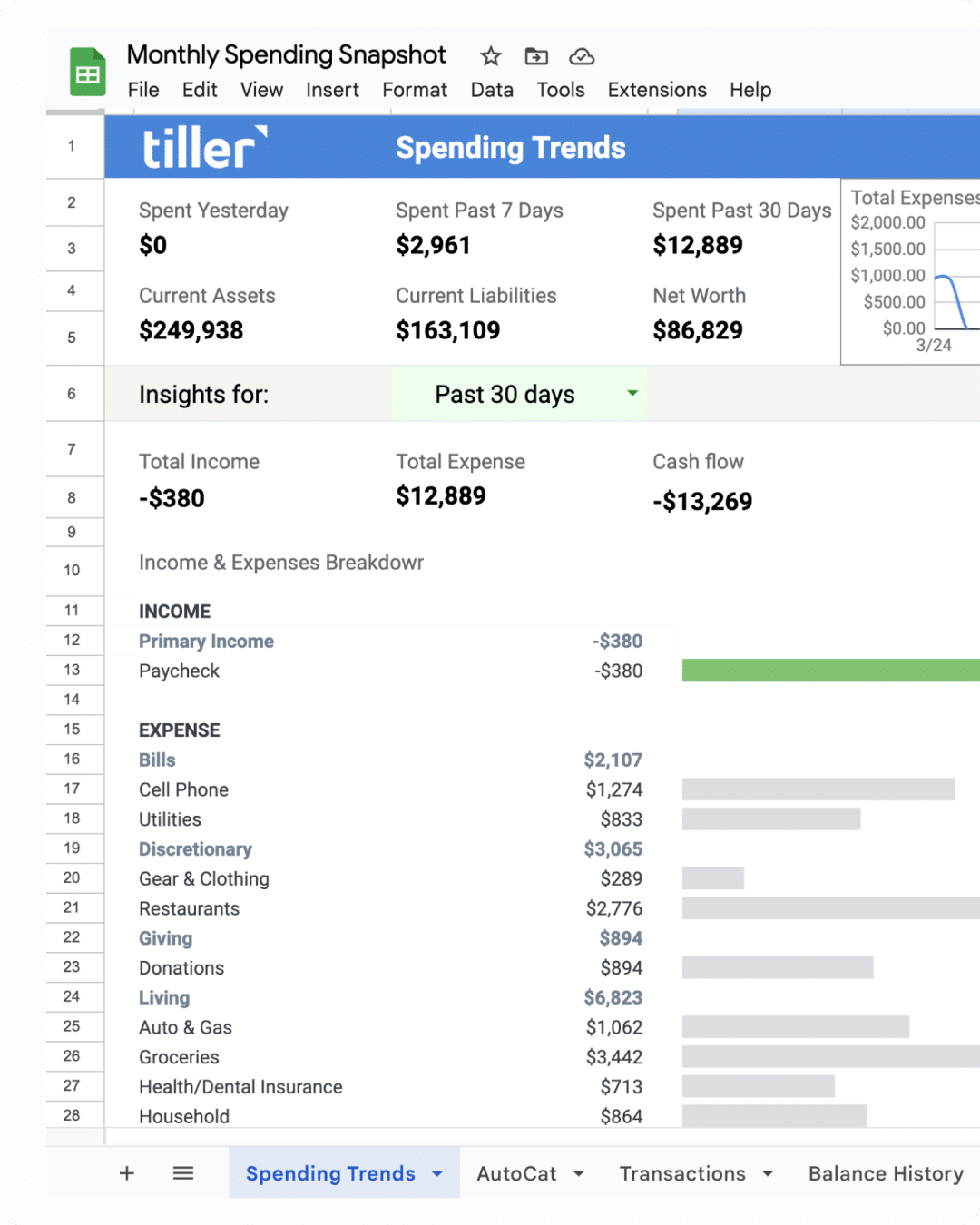
Know Exactly Where
Your Money Goes
All your spending flows into Tiller’s Spending Trends sheet, so you can easily track your trends and control expenses.
“I’ve been trying Tiller and so far I’ve found $564/year in subscriptions we no longer needed, didn’t know we had, or had forgotten to cancel.”


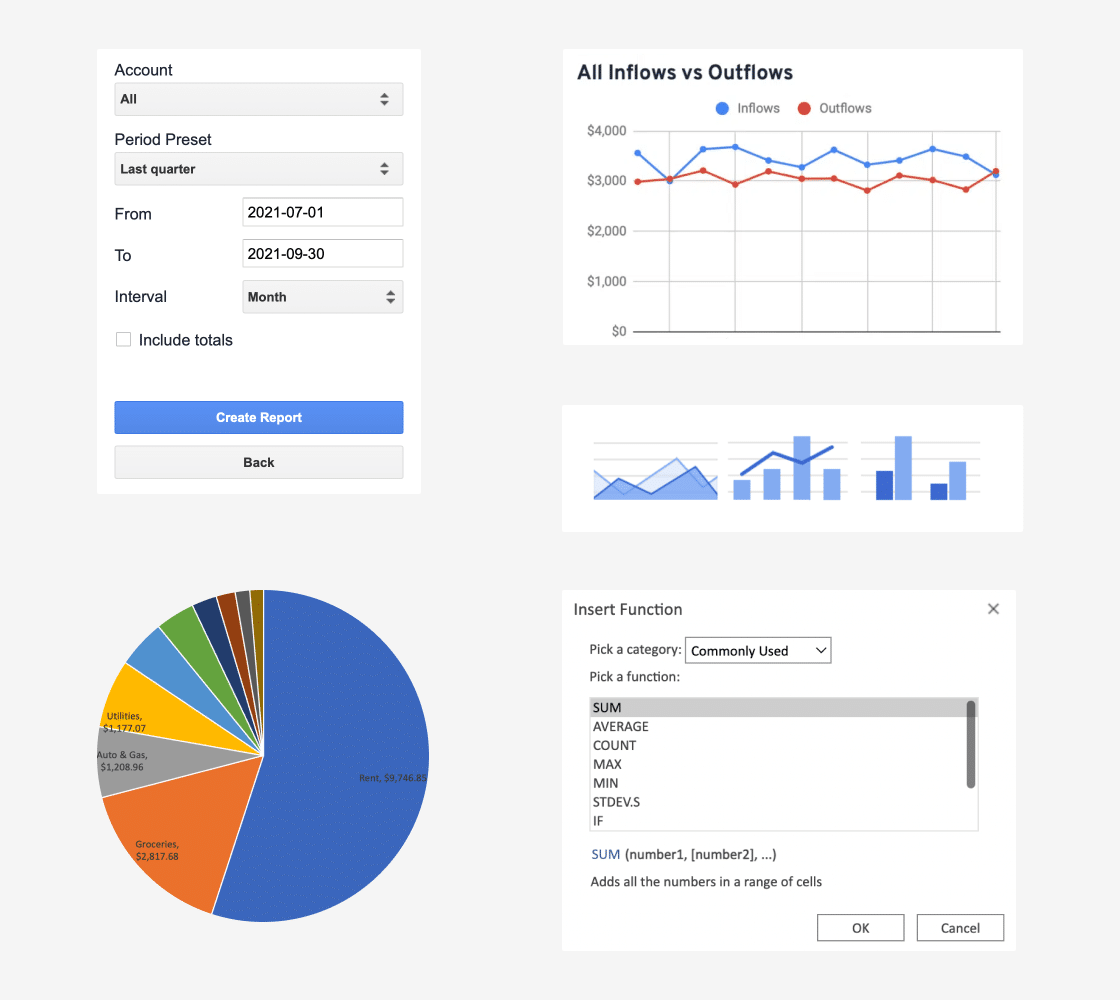
MANAGE YOUR MONEY, YOUR WAY
Customize Everything
Tiller is the most flexible personal finance service. Create your own category rules. Build custom reports and templates. You can even choose preferred fonts and colors.
“I’ve been trying Tiller and so far I’ve found $564/year in subscriptions we no longer needed, didn’t know we had, or had forgotten to cancel.”
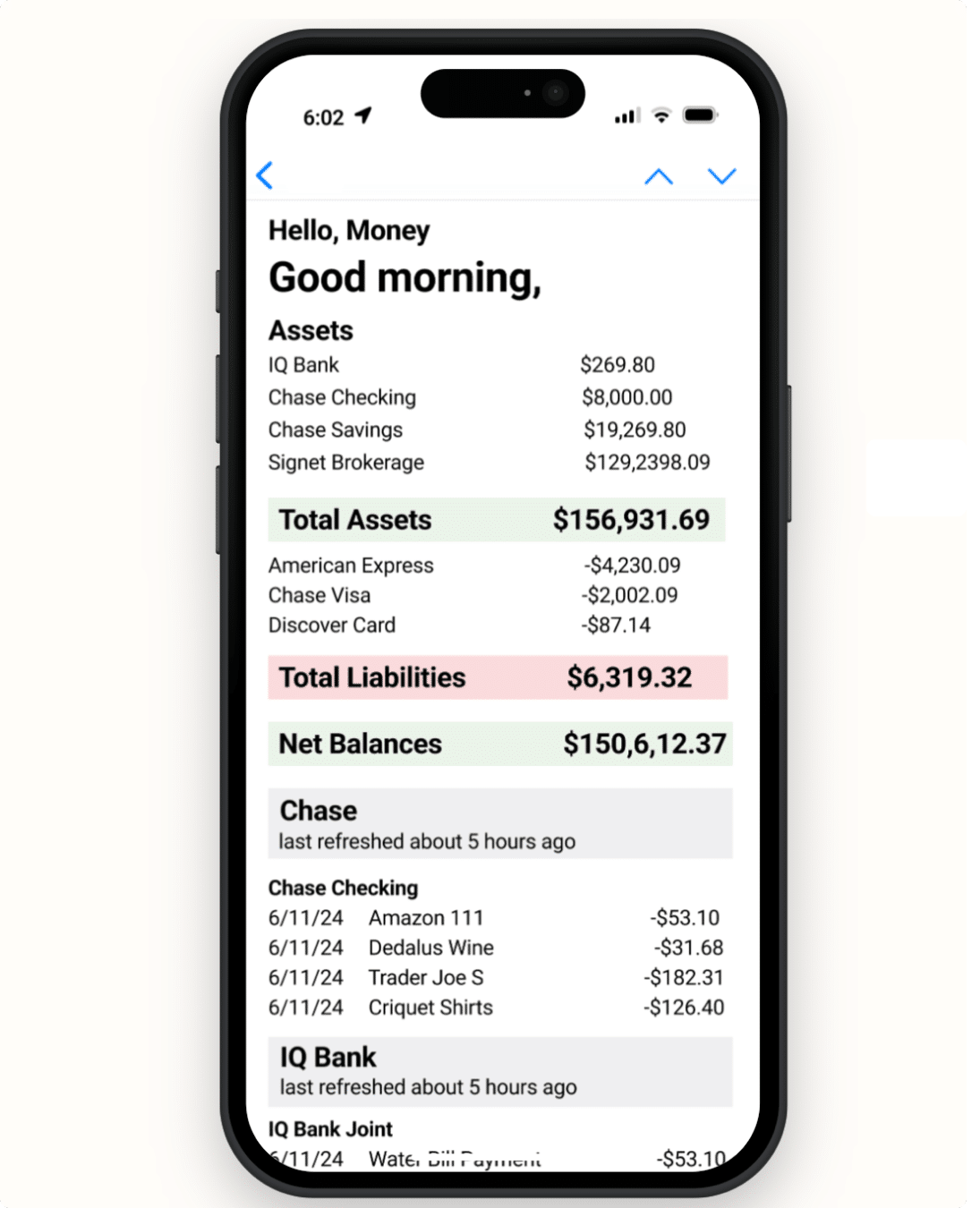
HELLO, MONEY
Keep Up On the Go
No time for spreadsheets? Review the latest charges and balances across all your accounts with a quick email each morning.
Help Is Here If You Need It

Tiller’s top-rated support options include a dedicated, US-based customer success team, helpful user Community, and extensive documentation.
“Always helpful, very knowledgeable, and a consistent support crew.”

Your Data is Not for Sale
Tiller feeds your financial data into your private spreadsheets under your control. Tiller is not venture-funded. We don’t sell your data or show ads. We’re proud to be solely supported exclusively by your subscription.
“I love that my spreadsheets are mine forever, unlike another program I used that became obsolete.“
Tiller is Trusted and Recommended

“Tiller is a comprehensive tool to keep control of your finances. The team is super helpful. Tiller sends an optional daily email so you can stay on top of spending and not let it get out of control.”
“I love Tiller. Great if you want a detailed account of your money. Tiller helped me finally understand where my money was going and build an accurate projection of my finances.”
“Tiller does what it says and works well. I like that Tiller keeps my data in my own Google account, and I can use the spreadsheet tools I’m already familiar with to analyze my data.”



“Before Tiller, I used Mint. I love the flexibility of Tiller far more. My favorite is making my own categories and groups. I don’t have to keep ‘mandatory’ categories I don’t use. No ads is a major plus.“
“Fantastic Mint replacement. With Tiller, I have all my data in Excel and can make my own reports, transforms, planning, etc. Support is fast and professional.”
“I had been a long-time YNAB user but did not like their strict budgeting principles. Tiller is very flexible and easy to use.“



“I began using Tiller when Mint indicated they would end their service. I wish I’d been aware of Tiller much earlier. I could not be happier. With one year of my financial history now in Tiller, my understanding of my finances has never been better!
“I was a Quicken user and a Google Sheets fan. Tiller is the best of both worlds. AutoCat rocks for categorizing everything.“
“Tiller is fantastic. I even have separate files for my teens. It is great for teaching them to track finances, set goals and save for their future in IRAs and brokerage accounts.”