
Your money, ready for the AI you choose
Tiller turns your financial activity into a source of truth you own, ready for AI analysis and agentic workflows.


Your financial accounts → your financial record updated daily by Tiller → the AI you choose
The financial data your AI needs, updated in a spreadsheet you own
Spreadsheets are the universal interface for understanding money. Tiller turns your spreadsheets into an automated personal finance system, ready for you and the AI you choose.
Up-to-date financial data
Tiller automatically imports new balances and transactions from all your connected accounts into your spreadsheet each day, standardized as they arrive.
Answers you can check
Easily verify an AI answer in your spreadsheet against the source rows and formulas behind it. Ask AI to show you the source behind the answer.
.
Organized for you and AI
AutoCat automatically categorizes new transactions using rules you set. Optional AI Suggest is now in Google Sheets.
More context. Less to guess.
Your categories and corrections stay with your financial history, so AI can use decisions you’ve already made.
How Tiller spreadsheets are different
For over 10 years, Tiller’s meticulously engineered spreadsheets have transformed hundreds of millions of transactions into a structured source of financial truth for tens of thousands of users. That same structure now gives AI the categories and context it needs to interpret your money the way you do.
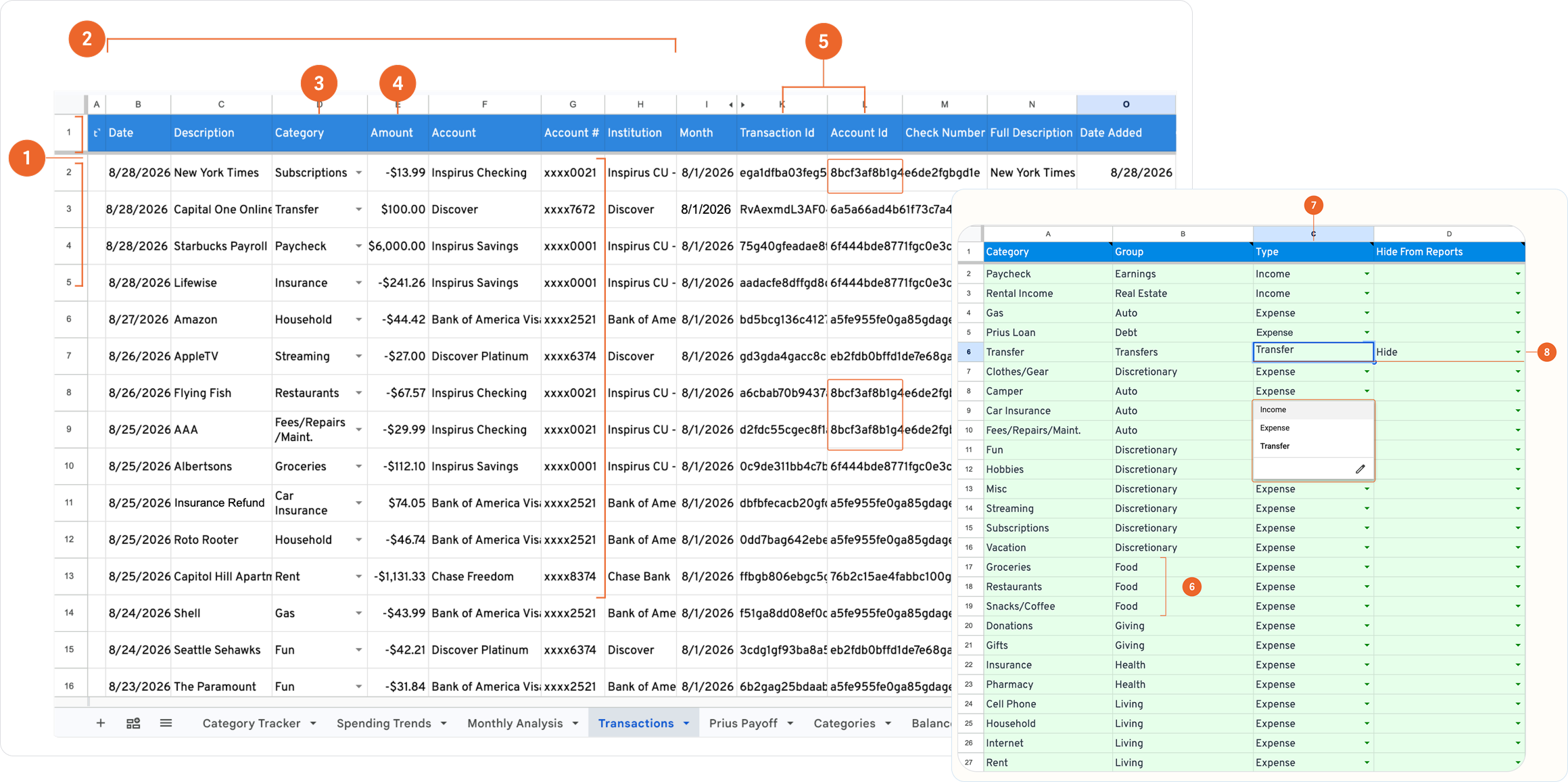
1. One transaction per row.
Each row uses clearly named fields, so AI can find, filter, and group source records without first interpreting a custom layout.
2. Standardized fields across institutions.
Tiller writes transactions from connected institutions to the same Date, Description, Category, Amount, Account, and Institution fields. AI can compare activity across accounts without reconciling different bank formats.
3. Transactions carry your categories.
AI reads the category you assigned instead of guessing what a transaction means from the merchant description.
4. Source data stays separate from reports.
Transactions and Categories hold the underlying records and definitions. Reports use that data without replacing it, so AI is less likely to mistake a subtotal or target for a transaction.
5. Stable IDs keep records connected.
Every transaction has its own Transaction ID. Rows from the same account carry the same Account ID. AI and software can find duplicates, group activity, and trace results without relying on names
6. Groups define how categories roll up.
Groceries, Restaurants, and Snacks/Coffee can all belong to Food. AI can follow the grouping you defined instead of deciding which categories belong together.
7. Income, expenses, and transfers are explicit.
Each category is labeled Income, Expense, or Transfer. That keeps a transfer from being mistaken for income or counted again as spending.
8. Report exclusions stay with each category.
A category marked Hide from Reports remains in the source data while giving reports and AI a clear exclusion rule to follow.
How to use your AI Tiller spreadsheets to unlock AI
Unlock new ways to stay on top of your money
With your finances updated in your spreadsheet, AI can efficintly and accurately answer questions, spot changes, build reports, and help you stay on top of your money.
Get a scheduled money briefing
Schedule a daily, weekly, or monthly briefing around the accounts, categories, budgets, and changes you care about. AI reviews recent balances and transactions, summarizes what changed, and flags anything needing attention.
“Every Monday, summarize what changed across my accounts last week. Flag unusual spending, categories likely to go over budget, and transactions I should review.”
Get answers about your money
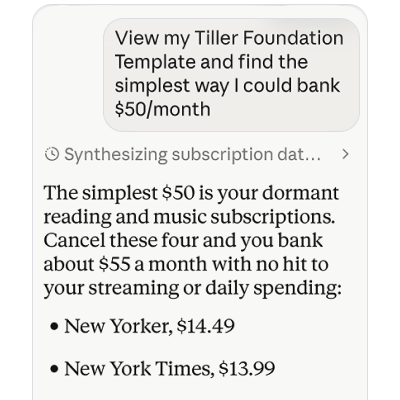
Ask AI to compare periods, explain a budget change, find recurring charges, or show the transactions behind a number. The answer can draw from your balances, categories, budgets, and financial history.
“Why was grocery spending higher in July than in June? Show me the transactions that drove the increase.”
Build the reports you want
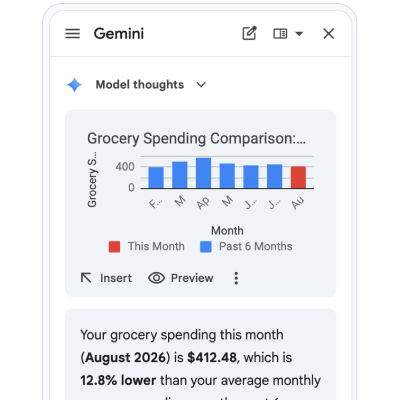
Describe the view you need instead of starting with formula syntax. AI can create formulas, tables, charts, dashboards, or scripts around your categories and data. The result stays in your spreadsheet to inspect, edit, and reuse.
“Create a report that shows dining spending by month for the past two years.”
Automate recurring tasks
Use AI agents or automations to review transactions, audit categories, update reports, and prepare monthly summaries. Advanced users can connect other tools through APIs, MCP, or custom workflows.
“Each month, audit uncategorized transactions, update my spending report, and summarize anything that needs attention.”
Plan cash flow and compare scenarios
Use your income, spending, balances, and debt details to test a decision before you make it. Compare payoff plans, budget changes, or upcoming expenses and see how each option affects your cash flow.
“If I add $300 a month to the car payment, when would the loan be paid off?”
AI, YOUR WAY
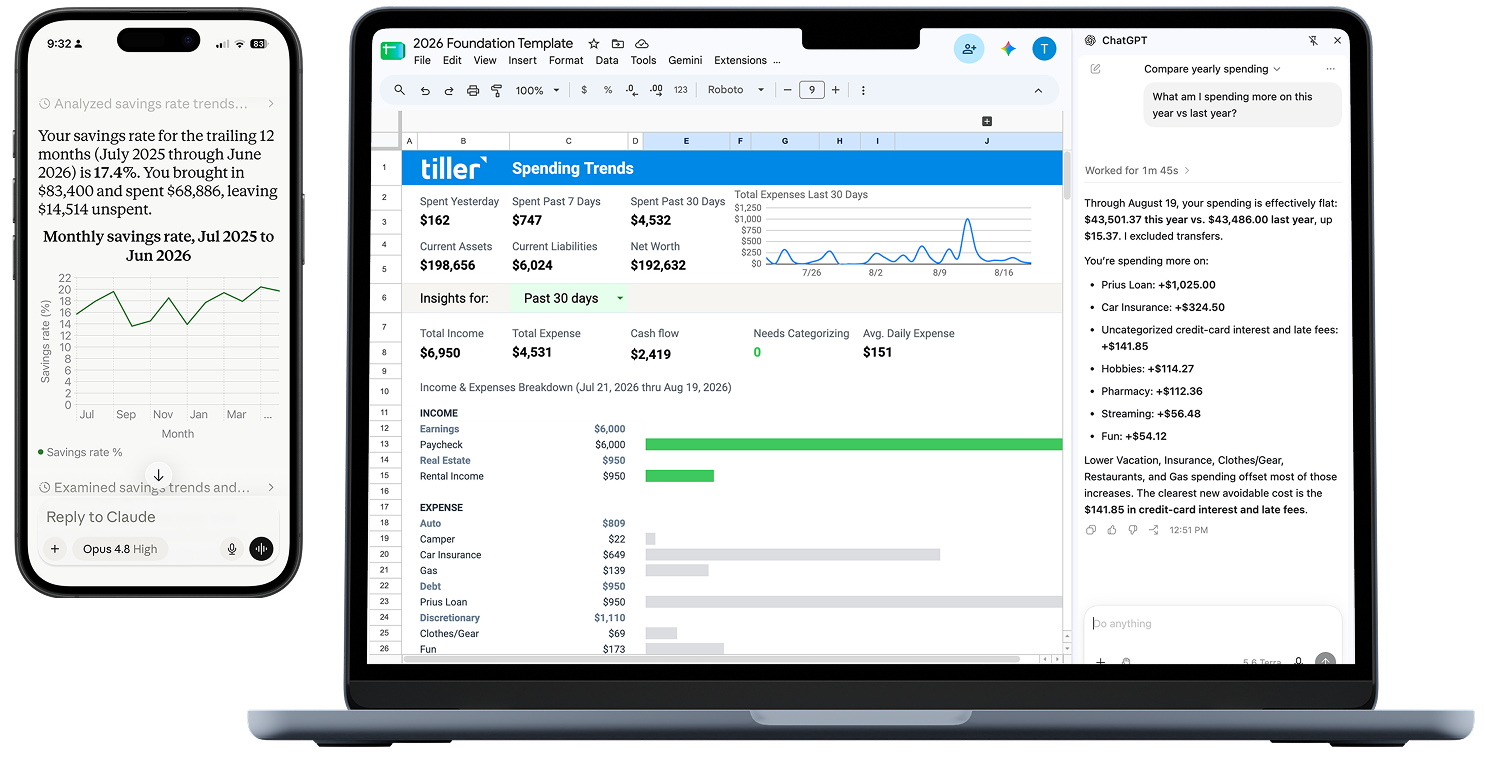
Tiller gives you more choices for navigating your finances with AI

Microsoft Copilot in Excel
Compare trends, create formulas, and build or update workbook content directly inside Excel.
Best for: Analysis, formulas, trends, charts, and PivotTables
Learn more ›

Tiller MCP for Claude
Ask about spending, balances, and trends. Categorize transactions and create reports on the go.
Best for: Questions about Tiller data, categorization, and reports in Claude
Learn more ›

ChatGPT in Google Sheets and Excel
Analyze your data, explain formulas, and build reports without leaving the spreadsheet.
Best for: Analysis, formulas, reports, and spreadsheet changes.
Learn more ›

Gemini in Google Sheets
Create formulas, analyze data, and build charts and tables directly in Google Sheets.
Best for: Analysis, formulas, charts, and PivotTables.
Learn more ›
Share a range or file
Share only the rows, tabs, or copy you provide, without sharing your entire spreadsheet.
Best for: Focused questions without ongoing access.
Learn more ›
Agentic Workflows
Point your agents at your spreadsheet for multi-step work with the permissions you provide.
Best for: Recurring multi-step work: categorization passes, monthly audits, scheduled reports.
Learn more ›
“The approach of using Tiller with large language models—including ChatGPT, Grok, and Claude—aligns well with the goal of transforming personal finance from a source of stress into a structured, repeatable process. Tiller’s established capabilities, such as automated transaction feeds into spreadsheets and features like AutoCat for categorization, provide a strong foundation for deeper analysis and automation. This combination enables more sophisticated insights, forecasting, and decision support without requiring manual intervention at every step.” – James, Google Workspace Review, May 28, 2026
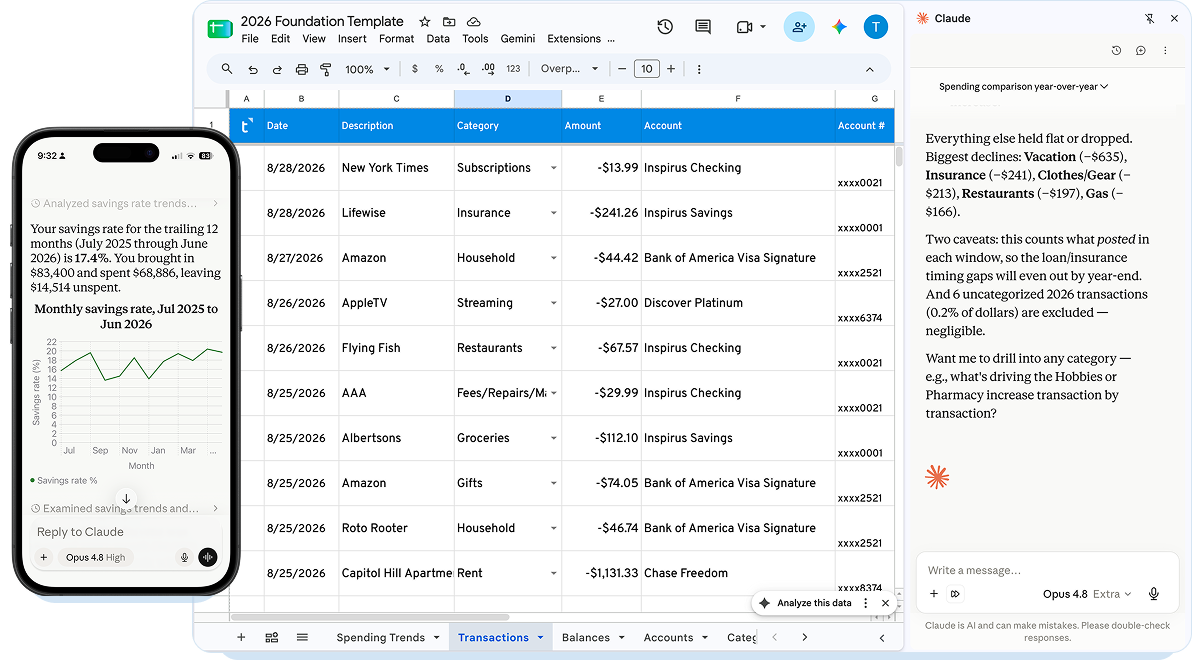
See the answer. Check the source.
Ask AI to show the accounts, dates, categories, exclusions, and source rows behind an answer. Learn more ›
Your spreadsheet stays yours
Apps come and go. AI models change. Your spreadsheet stays where you saved it, with your history and decisions intact, even if you switch tools or stop using Tiller. Learn more ›
You decide what AI sees
AI is optional with Tiller. A selected range or working copy lets you share only the rows, accounts, or dates a question needs, limiting exposure and making the answer easier to check. Learn more ›
Frequently asked questions
Is Tiller an AI company?
Tiller is a leading spreadsheet-based personal finance service, launched in 2016. It automatically tracks your spending, income, and balances in Google Sheets and Microsoft Excel, with prebuilt money templates and U.S.-based support. And because your data lives in clean, structured spreadsheets you own, any AI you choose can read and work with it.
Can I use AI with Tiller?
Yes. Tiller offers optional AI Suggest categorization and a live MCP connection for Claude. You can also use a Tiller spreadsheet with compatible AI tools in Google Sheets or Microsoft Excel, or share selected spreadsheet data for a focused task.
Does Tiller work with Claude?
Yes. Tiller connects directly to Claude through MCP for questions, transaction categorization, and reports. Claude also works inside Microsoft Excel through Anthropic’s Excel add-in.
Does Tiller work with ChatGPT?
Yes. Eligible ChatGPT plans can work with spreadsheets in Google Sheets and Microsoft Excel. ChatGPT can analyze a Tiller spreadsheet, create or update formulas and reports, explain spreadsheet logic, and make supported spreadsheet changes.
Does Tiller work with Gemini?
Yes. Gemini works directly in Google Sheets on eligible Google plans. Tiller also uses Gemini for optional AI Suggest categorization in Google Sheets with Direct Fills.
Does Tiller work with Microsoft Copilot?
Yes. Copilot works inside Microsoft Excel on eligible Microsoft 365 plans and can analyze data, generate formulas, compare trends, and build or edit workbook content.
Does Tiller have an MCP server?
Yes. Tiller MCP is live for Claude and available through Claude’s connector directory.
What is AI Suggest?
AI Suggest is an optional AutoCat feature for Google Sheets with Direct Fills. After AutoCat Rules and Description Match run, AI Suggest can propose categories for transactions that remain uncategorized.
Do I need a paid AI subscription?
Requirements vary by provider, product, and account. Each setup guide lists the current requirements for that workflow.
Can an AI tool change my spreadsheet?
Some workflows can edit the spreadsheet, while others only receive the data you choose to share. Each setup guide lists the permissions for that workflow.
Can I try AI with Tiller without using my financial data?
Yes. Here’s sample data you can use to test prompts, reports, and workflows without using your financial data:
Google Sheets: Tiller Feeds Sample Data (for Google Builders)
Microsoft Excel: Tiller Feeds Sample Data (for Excel Builders)
Can I use Tiller without AI?
Yes. Tiller keeps connected financial data updated and organized in your spreadsheet without an AI assistant. You choose whether to use AI Suggest, Tiller MCP, or a third-party AI tool.
What happens if I switch AI or use multiple models?
Your spreadsheet, financial history, categories, formulas, and reports do not depend on one AI provider. You can use the same spreadsheet with another compatible AI workflow later.
