Along with many members of the Tiller Community, Tiller’s team is enthusiastically experimenting with ChatGPT in Google Sheets.
These experiments are isolated from our product development and experience to maintain Tiller’s strict privacy and security protocols.
However, we’re excited by the potential of generative AI.
Soon everyone will have easy, optional access to native AI tools in their spreadsheets, unleashing new ways to organize, visualize, and understand data.
Later this spring, Microsoft Copilot will bring OpenAI’s ChatGPT to Microsoft 365, including Excel.
And Google is rapidly bringing generative AI to its entire Workspace suite, starting with Docs and Gmail. Sheets is close behind.
How to Connect ChatGPT to Google Sheets
When Google brings generative AI to Google Sheets, it won’t be via OpenAI’s familiar ChatGPT. It may take the form of Bard, an AI chatbot based on LaMDA, which Google started working on back in 2015.
But even when Google has its own native AI tools available in Google Sheets, some people may prefer OpenAI’s ChatGPT. And if you want to start experimenting with natural language AI in your Google Sheets right now, ChatGPT is your best bet.
So here are a few extensions and workflows for connecting ChatGPT and your Google Sheets. But please note:
To protect your privacy, always exercise caution when connecting third-party extensions, code, and templates to Google Sheets. Even though you can roll back changes in Google Sheets, we don’t recommend experimenting with these workflows in your Tiller-powered sheets until you’re sure they’re safe, private, and effective.
1. Google Apps Script and ChatGPT API
Want to access ChatGPT from Google Sheets, but don’t want to use a third-party extension? Google Apps Script to the rescue!
This concise blog post provides example code and a written tutorial for deploying it.
Here’s another more detailed post about how to connect ChatGPT To Google Sheets using Google Apps Script.
And here’s a video on this topic from yet another source:
2. Import OpenAI (ChatGPT) Data to Google Sheets with the Mixed Analytics Extension

Mixed Analytics has a great tutorial for pulling data from the OpenAPI (ChatGPT) API directly into Google Sheets, using their free API Connector add-on for Sheets.
You can use this method to generate text content and images in response to prompts you enter in your spreadsheet.
3. Use a Zapier Connection Between OpenAI and Google Sheets

Read how Zapier can link OpenAI (GPT-3 & DALL·E) to Google Sheets.
4. GPT for Sheets and Docs
GPT for Sheets and Docs is currently the ChatGPT extension with the highest number of installs and reviews. It was created by Talarian, maker of the super-popular “Yet Another Mail Merge” extension for Google Sheets.
GPT for Sheets™ and Docs™ is an AI writer for Google Sheets™ and Google Docs™. It enables you to use ChatGPT directly in Google Sheets™ and Docs™. It is built on top OpenAI ChatGPT, GPT-3 and GPT-4 models. You can use it for all sorts of tasks on text: writing, editing, extracting, cleaning, translating, summarizing, outlining, explaining, etc
- Price: Free
- Learn more: Website and Google Workspace Marketplace
5. PromptLoop for Google Sheets
One formula to transform, extract, or summarize any text that works just like SUM or VLOOKUP and generates answers. Use powerful AI models like GPT-3 in Google Sheets.
This add-on lets you use a custom formula to automatically complete any text-based task, from categorizing and summarizing to formatting and translating. They also have a small gallery of ChatGPT templates.
- Pricing: Free to $49 or higher with an enterprise plan
- Learn more: Website and Google Workspace Marketplace
6. Flowshot – Google Sheets AI
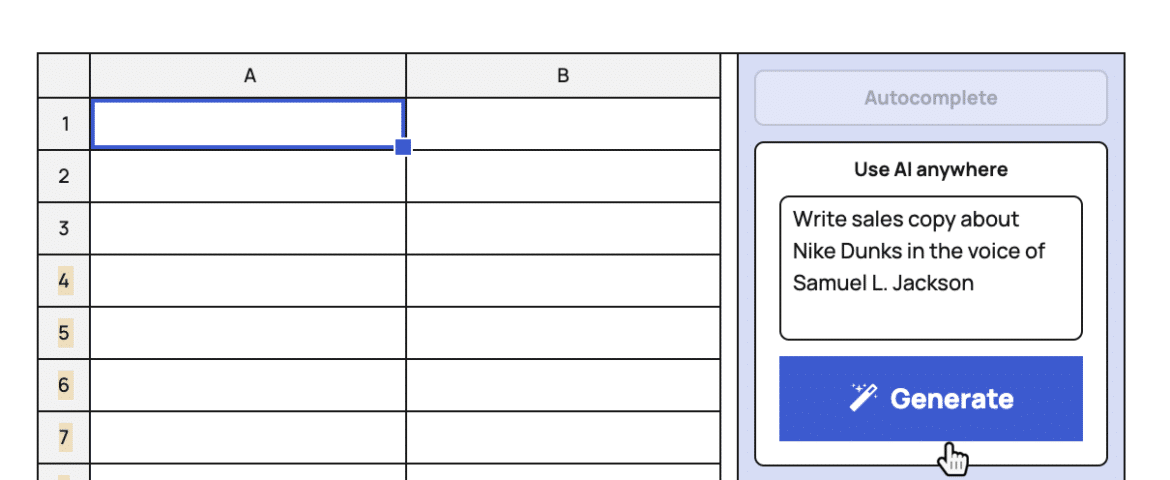
Easy to use, powerful AI in Google Sheets. Autocomplete repetitive tasks, use ChatGPT, and train custom AI models with the all-in-one AI toolkit.
- Pricing: Free to $129/month
- Learn more: Website and Google Workspace Marketplace
7. GPTSheets Chrome Extention
To make GPTSheets work, you’ll need to install a Chrome extension and add a snippet of code to any spreadsheet you’d like GPTSheets to work on.
GPTSheets is a Chrome extension that brings the power of OpenAI’s GPT language model to your spreadsheets.
With GPTSheets, you can create spreadsheet formulas and functions simply by typing them out in plain English. It can also explain spreadsheet formulas/functions in plain English. Simply highlight a formula, and our tool will translate it into plain English, making it easier for you to understand and modify.
- Pricing: Try Free, then $15/month
- Learn more: Website and Google Chrome Store