Paycheck Register Spreadsheet

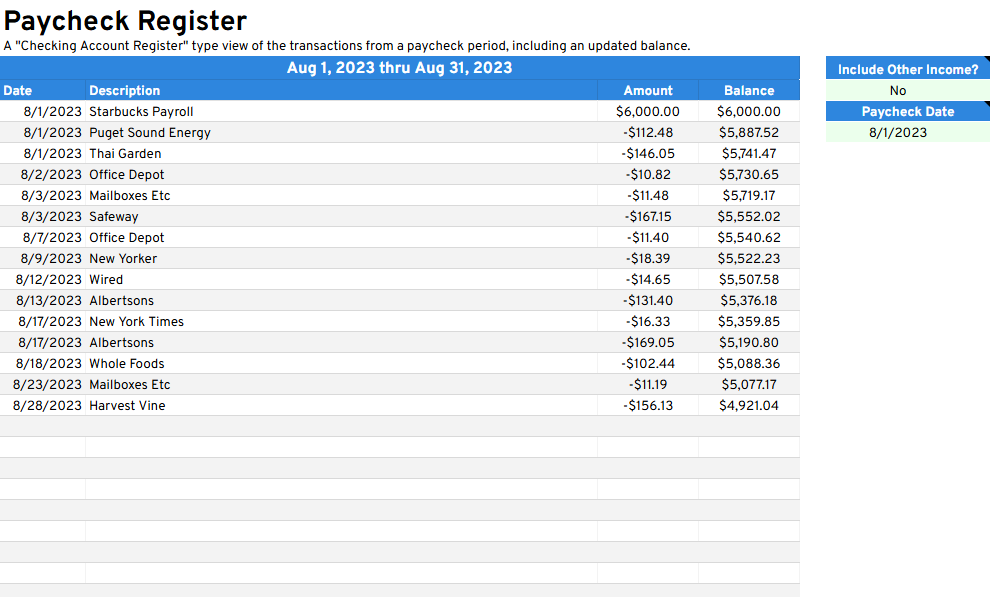
The Paycheck Register is a Google Sheets template that compares your paycheck amount against the spending you do within the same pay period.

About the Paycheck Register Spreadsheet

The Paycheck Register gives you a clear view of one pay period at a time, listing the paycheck you received on a selected date, along with every expense and income transaction until your next check arrives. It’s a useful way to understand whether your spending between paychecks is aligned with what you actually brought in.

Unlike account-based views, this sheet organizes your financial picture around your pay schedule. You can choose to exclude other income transactions to focus purely on spending against a single paycheck, and it supports weekly, biweekly, semimonthly, and monthly pay frequencies.

Best for: Salaried employees on a predictable pay schedule who want to understand whether their spending aligns with each paycheck.

Built by Tiller Community member @jpfieber for Google Sheets.


Support & Documentation

Install the Paycheck Register through the Tiller Community Solutions add-on. Search for it in the Explore tab.

For setup details, configuration tips, and community discussion, visit the Paycheck Register thread in the Tiller Community.

If you run into an issue, search the community first and if your question hasn’t been answered, post it in the Get Help > Spreadsheet Templates category.
FAQ

Unless otherwise noted above, this is a free template built by a member of the Tiller Community. Some community templates may only be accessible via the Tiller Money Feeds add-on, which requires a Tiller free trial or subscription to use. Additionally, it’s recommended for use within the Foundation Template.

Tiller is the only automated personal finance service for Google Sheets and Microsoft Excel. Tiller automatically imports your daily spending, income, and balances in your spreadsheets, so you can see all your finances in one place and manage your money, your way. Learn more →

Unless otherwise noted above, this free template is installed with the Tiller Community Solutions add-on for Google Sheets. It's an easy way to browse and install dozens of free, prebuilt sheets for tracking budgets, debt payoff goals, net worth, savings, and more, all from the Google Sheets sidebar. Some community templates can be installed using Tiller Money Feeds. See Installation details above.

This template for Excel works best when installed in Tiller’s Foundation Template.

Review the Support and Documentation section in the template details above to learn how to get support for this template in the Tiller Community.

Leave a Reply