Wedding Budget and Planner Spreadsheet

A free wedding budget spreadsheet for Google Sheets with tools for budgeting, tracking RSVPs, planning seating, and more. Use it standalone or connect it to Tiller to track spending automatically.

About the Wedding Budget and Planner Spreadsheet

The Wedding Budget and Planner is a free Google Sheets template that gives you everything you need to plan and track your wedding finances in one place. It works as a standalone spreadsheet with manual entry, or connect it to Tiller to automatically import your wedding spending directly from your bank and credit card accounts, keeping your budget current without any data entry.

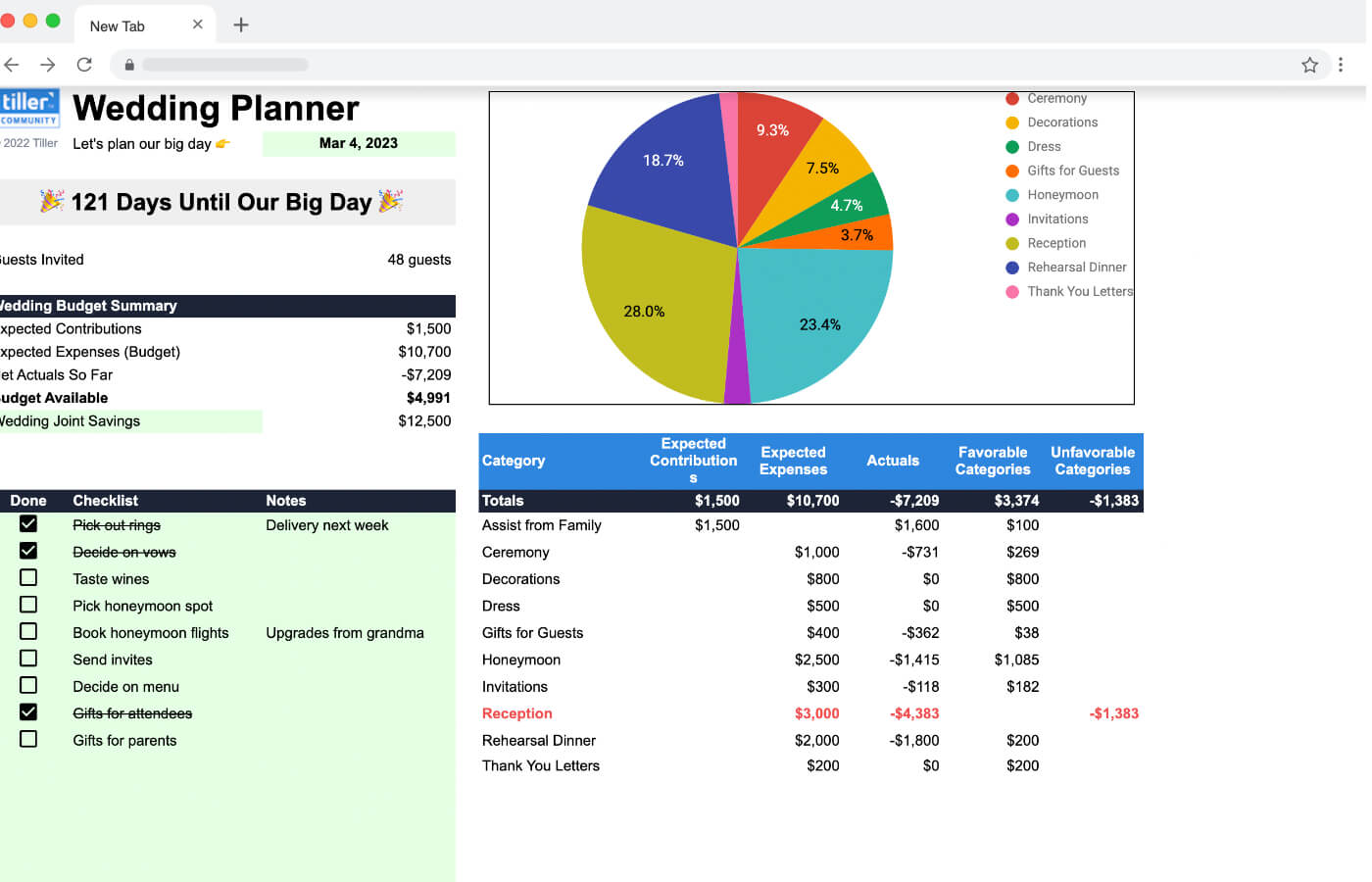
The template includes five sheets covering every dimension of wedding planning: a Summary Sheet with countdown, budget overview, to-do checklist, and expense pie chart; a Guest List Organizer for RSVPs, counts, and gifts; a Table Seating Planner; a customizable Expense Categories sheet; and a Transactions sheet that works manually or automatically with Tiller.

Best for: Couples planning a wedding who want a structured, shareable budget spreadsheet.

Get the Template

Open the Wedding Budget and Planner template in Google Sheets. Click “Use Template” in the upper right corner to save your own copy.

Open Google Sheets Template →

Support & Documentation

For questions and community discussion, visit the Wedding Budget and Planner thread in the Tiller Community.
FAQ

Unless otherwise noted above, this is a free template built by a member of the Tiller Community. Some community templates may only be accessible via the Tiller Money Feeds add-on, which requires a Tiller free trial or subscription to use. Additionally, it’s recommended for use within the Foundation Template.

Tiller is the only automated personal finance service for Google Sheets and Microsoft Excel. Tiller automatically imports your daily spending, income, and balances in your spreadsheets, so you can see all your finances in one place and manage your money, your way. Learn more →

Unless otherwise noted above, this free template is installed with the Tiller Community Solutions add-on for Google Sheets. It's an easy way to browse and install dozens of free, prebuilt sheets for tracking budgets, debt payoff goals, net worth, savings, and more, all from the Google Sheets sidebar. Some community templates can be installed using Tiller Money Feeds. See Installation details above.

This template for Excel works best when installed in Tiller’s Foundation Template.

Review the Support and Documentation section in the template details above to learn how to get support for this template in the Tiller Community.

Leave a Reply