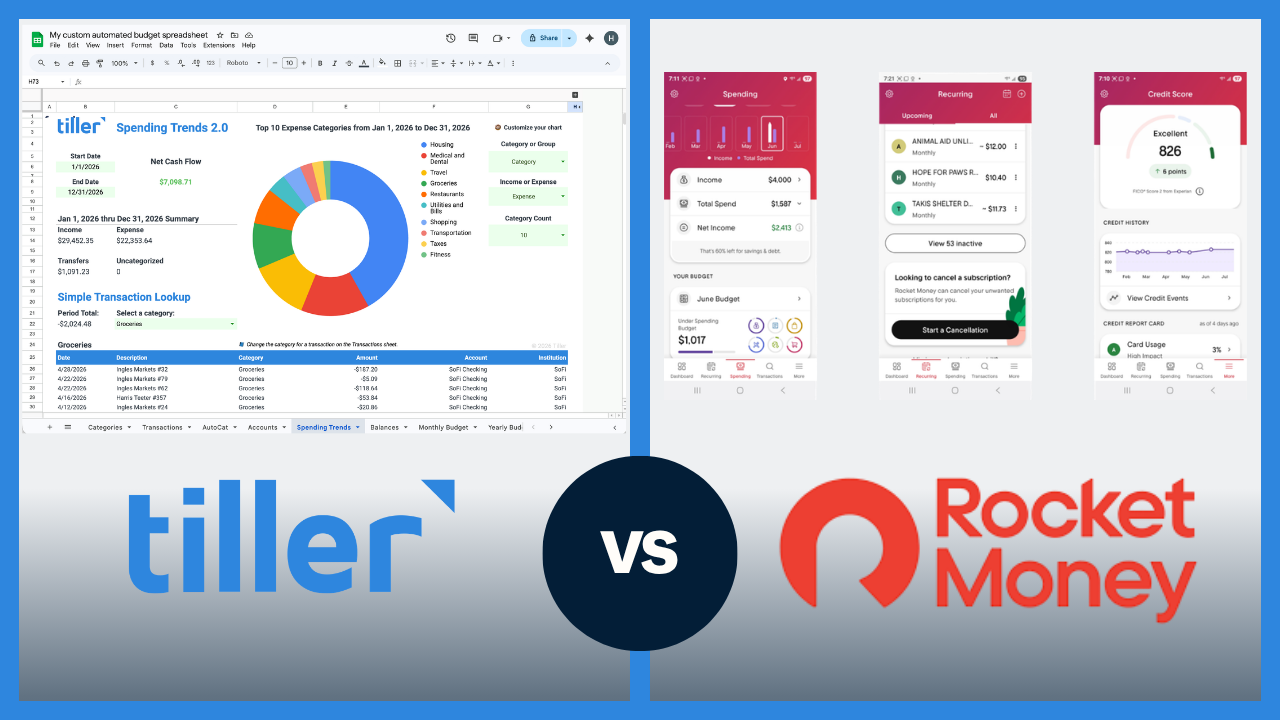
Tiller and Rocket Money both connect to your bank accounts, but they solve different problems. Rocket Money is built around finding and canceling unwanted subscriptions, negotiating bills, and giving you a quick financial snapshot. Tiller is built for people who want to actively manage their budget in a spreadsheet they fully own and control.
The short answer
Rocket Money is a personal finance app focused on subscription tracking, bill negotiation, and automated savings, with budgeting features integrated into a broader money management dashboard.
Tiller is a financial automation tool that delivers your transactions daily into Google Sheets or Excel, where you build and manage a complete budgeting and financial tracking system with full control over structure, categories, and reporting.
If your primary goal is to find and cancel subscriptions, negotiate lower bills, or automate savings with minimal effort, Rocket Money is the better fit. If your primary goal is to actively budget, track spending by category, and manage your finances in a customizable spreadsheet you own, Tiller is the better choice. Because their features are different, many people use both services.
Quick comparison: Tiller vs. Rocket Money at a glance
| Tiller | Rocket Money | |
|---|---|---|
| Price | $99/year | Free (basic) or $7–$14/month (premium, “pay what you think is fair”) |
| Platform | Google Sheets or Excel | App (iOS, Android, web) |
| Bank sync | Yes — automatic daily import | Yes — automatic sync |
| Primary focus | Budgeting and financial management | Subscription tracking and bill negotiation |
| Budgeting depth | High — fully customizable | Moderate — basic budget categories |
| Subscription management | No | Yes — core feature |
| Bill negotiation | No | Yes — negotiates on your behalf |
| Automated savings | No | Yes |
| Data ownership | You own your data and the spreadsheet | Stored in Rocket Money’s platform |
| Customization | High — full spreadsheet control | Low — works within Rocket Money’s structure |
| Categorization | AutoCat — rule-based, 100% accurate on defined rules | Basic auto-categorization |
| Mobile app | No dedicated app | Yes, strong mobile app |
| Free tier | No (30-day trial) | Yes |
What Rocket Money is best at
Rocket Money’s core product is subscription management. It connects to your accounts, automatically identifies recurring charges, and lets you cancel unwanted subscriptions directly from the app. Its bill negotiation service is very helpful. Rocket Money’s team negotiates lower rates on bills like cable, internet, and insurance on your behalf, taking a percentage of the savings as their fee. Automated savings rules round out the passive money-saving toolkit.
Budgeting is included in Rocket Money, but it’s a secondary feature that offers a basic category breakdown, spending summaries, and a high-level view of your finances. Day-to-day use is mostly passive: you connect accounts, let Rocket Money surface alerts, and review recommendations. If you want your money managed for you in the background, it is well-designed for that.
Rocket Money doesn’t do deep, category-by-category active budgeting. The budgeting features are not its core strength, and users looking for sophisticated transaction review and spending management will find it falls short.
What Tiller is best at
Tiller connects your bank accounts and delivers transactions and balances daily into Google Sheets or Excel via the Tiller add-on. The Foundation Template gives you a pre-built transaction log, budget vs. actual view, and net worth tracker — usable from day one and fully customizable from there.
Tiller is designed for active budgeting, including reviewing transactions, managing spending by category, and making intentional spending decisions. Every morning, your new transactions are in your spreadsheet. A quick review keeps your budget current and surfaces anything that needs attention. Because the system lives in a spreadsheet, you can build whatever financial system your situation requires — debt payoff trackers, savings rate calculators, net worth trend charts, or anything else.
Unlike Rocket Money’s passive model, Tiller requires some regular engagement — reviewing and categorizing transactions, checking the budget view.
Pricing
Rocket Money has a free tier that includes subscription tracking and a basic financial overview. The premium tier ($7–$14/month, “pay what you think is fair”) unlocks bill negotiation, unlimited transaction history, custom budget categories, and automated savings. Tiller costs $99/year with a 30-day free trial.
Where they don’t overlap — and where they do
What only Rocket Money does:
- Subscription identification and cancellation
- Bill negotiation (saves money automatically; Rocket Money takes a percentage of savings as their fee)
- Automated savings rules
What only Tiller does:
- Deep, customizable budgeting in a spreadsheet you own
- Full control over categories, formulas, and financial reports
- Permanent data ownership independent of any platform
Where they overlap:
- Transaction import and categorization
- Basic spending summaries by category
- Net worth snapshot
Using both Tiller and Rocket Money Together
Rocket Money and Tiller solve different problems and don’t overlap in ways that create friction. A common setup is using Rocket Money’s free tier for subscription tracking and bill negotiation while using Tiller for active budgeting and transaction management. You get passive money-saving in the background and a complete budgeting system you own — without paying for redundant features.
Who should choose Rocket Money
Rocket Money is likely the stronger fit if:
- Your main goal is finding and canceling unused subscriptions
- You want someone to negotiate your bills on your behalf with no effort required from you
- You want a passive financial tool that works in the background
- You primarily check finances on your phone
- You don’t want to manage a spreadsheet or review transactions regularly
- You want a free tier to try before paying anything
Who should choose Tiller
Tiller is likely the stronger fit if:
- Your main goal is active budgeting — knowing where your money goes and making intentional spending decisions
- You’re comfortable in Google Sheets or Excel (or willing to learn)
- You want your financial data in a spreadsheet you fully own and control
- You want to build custom reports, dashboards, or financial models beyond what any app provides
- You used Mint before it shut down and want the closest equivalent to Mint’s budgeting and transaction tracking — in a format you own
- You want one system that handles budgeting, net worth tracking, and financial planning in one place
Browse free Google Sheets budget templates
Switching from Rocket Money to Tiller
Before canceling Rocket Money, export your transaction history as a CSV and note your existing budget categories — you’ll use those to set up Tiller’s Foundation Template.
Getting started takes most users under an hour. You connect accounts, review the first batch of imported transactions, map your categories, and check the budget view.
Note that switching to Tiller doesn’t mean losing subscription tracking capability. You can keep Rocket Money’s free tier for subscription management while using Tiller for your actual budgeting system.
Ready to make the switch? Start your free 30-day trial and connect your accounts in minutes.
The bottom line
Rocket Money and Tiller are both useful tools — they just do different things. Rocket Money is the right call for passive money management like finding subscriptions, negotiating bills, and automating savings. Tiller is the right call for active budget management in a spreadsheet you fully own.
Frequently asked questions
What is the main difference between Tiller and Rocket Money?
Tiller and Rocket Money serve different primary purposes. Rocket Money is built around subscription tracking, bill negotiation, and automated savings. It also includes basic budgeting features. Tiller is a financial automation tool that delivers your transactions daily into Google Sheets or Excel, where you build a complete, customizable budgeting and financial management system. Rocket Money is primarily a passive money-saving tool; Tiller is primarily an active budgeting tool.
Is Tiller better than Rocket Money for budgeting?
For serious, active budgeting, yes. Rocket Money includes basic budget categories and spending summaries, but budgeting is a secondary feature — its core strengths are subscription management and bill negotiation. Tiller is purpose-built for budgeting, including fully customizable transaction log, budget vs. actual tracking, net worth monitoring, and complete control over categories and reporting, all in a spreadsheet you own. If budgeting is your primary goal, Tiller is the deeper tool.
Can Tiller replace Rocket Money?
Partially. Tiller can replace Rocket Money’s budgeting and transaction tracking features completely. It cannot replace Rocket Money’s subscription identification, bill negotiation, or automated savings features. Some people use both: Rocket Money for passive subscription management and savings automation, Tiller for their active budgeting system. If you primarily want budgeting and financial tracking in a spreadsheet you own, Tiller is a full replacement for that part of what Rocket Money does.
Does Rocket Money do what Mint did?
Rocket Money covers some of what Mint did — automatic transaction imports, basic budget categories, spending summaries, and net worth tracking. But Mint’s budgeting features were more detailed than Rocket Money’s, and Mint didn’t focus on subscription management or bill negotiation the way Rocket Money does. For users who valued Mint’s active budgeting and transaction categorization most, Tiller is typically the closer replacement. For users who mainly used Mint for a financial overview and want passive money-saving features added, Rocket Money is a reasonable Mint alternative.
Is Rocket Money free?
Rocket Money offers a free tier that includes subscription tracking and basic financial overview features. The premium tier ($7–$14/month, “pay what you think is fair”) unlocks bill negotiation, unlimited transaction history, custom budget categories, and automated savings.
What does Rocket Money do that Tiller doesn’t?
Rocket Money does three things Tiller doesn’t do: subscription identification and cancellation (Rocket Money surfaces recurring charges and lets you cancel them directly), bill negotiation (Rocket Money’s team negotiates lower rates on your bills and takes a percentage of savings as their fee), and automated savings rules (Rocket Money can move money to a savings account automatically based on rules you set).
What does Tiller do that Rocket Money doesn’t?
Tiller gives you deep, customizable budgeting in a spreadsheet you own, including full control over your budget categories, formulas, and financial reports. You can build anything from a simple monthly budget to a multi-sheet financial system with net worth tracking, debt payoff projections, and custom dashboards. Your data lives in a Google Sheets or Excel file that belongs to you permanently, independent of any platform.
Why do people switch from Rocket Money to Tiller?
The most common reason is that Rocket Money’s budgeting features aren’t deep enough for users who want to actively manage their finances category by category. Rocket Money works well as a passive financial tool, but users who want to review every transaction, set detailed budget limits, and build a real picture of their financial situation often find they need something more. Tiller fills that gap, with the added benefit that your financial data lives in a spreadsheet you permanently own and control.