Tiller vs. Copilot Money: Which Is Right for You?
Copilot is the best-designed budgeting app for Apple users. Tiller puts your bank data in a spreadsheet you own. Here's an honest comparison of both and how to choose.
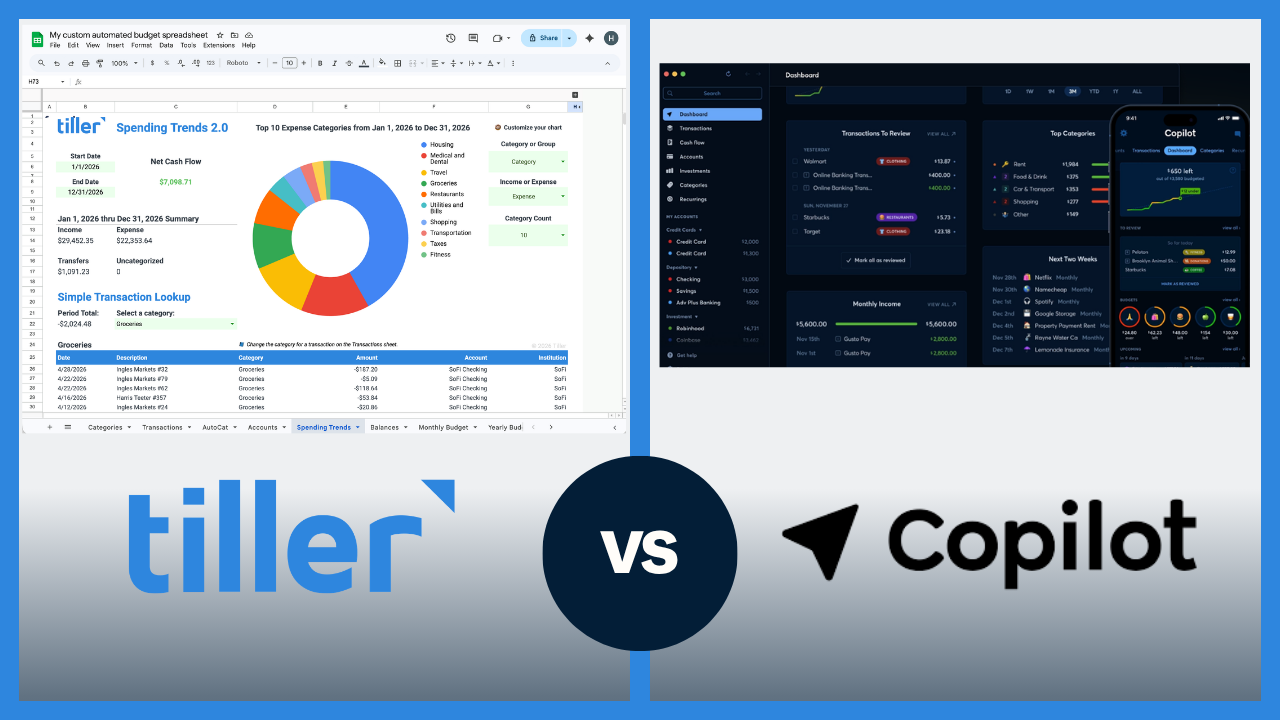
Copilot Money is one of the best-designed personal finance apps available. It’s built specifically for Apple users who want a beautiful, intelligent budgeting experience.
Tiller takes a different approach. It delivers your bank data directly into Google Sheets or Excel, where you build and manage your own financial system.
The short answer
Copilot Money is a premium, AI-assisted budgeting app designed for the Apple ecosystem with automatic bank sync, smart transaction categorization, and a polished interface built for iPhone and Mac. It now also has a web app.
Tiller is a financial automation tool that delivers your transactions daily into Google Sheets or Excel, where you build and manage a fully customizable budgeting and financial tracking system that works on any device or platform.
If you’re deeply embedded in Apple’s ecosystem and want the most polished, intelligent budgeting app available, Copilot Money is the stronger choice. If you want your financial data in a spreadsheet you own — with complete control over structure, reporting, and categories — and you need it to work on any platform, Tiller is likely the better fit.
Quick comparison: Tiller vs. Copilot Money at a glance
| Tiller | Copilot Money | |
|---|---|---|
| Price | $99/year | $95/year (or $13/month billed monthly) as of 04/26 |
| Platform | Google Sheets or Excel (any device) | Apple-first (iPhone, iPad, Mac, web) |
| Bank sync | Yes — automatic daily import | Yes — automatic sync |
| AI/smart features | AutoCat — rule-based, 100% accurate on defined rules | Yes — AI-assisted categorization and insights |
| Budgeting approach | Flexible — fully customizable | Built-in budgets with smart rollover |
| Customization | High — full spreadsheet control | Moderate — works within Copilot Money’s structure |
| Data ownership | You own your data and the spreadsheet | Stored in Copilot Money’s platform |
| Android / Windows | Yes (via Google Sheets / Excel) | No |
| Mobile app | No dedicated app | Yes, excellent native iOS app |
| Investment tracking | Via custom sheets | Yes — built-in |
| Free trial | 30 days | 30 days |
How Copilot Money works
Copilot Money connects to your financial accounts, syncs transactions automatically, and uses AI to categorize your spending, surface trends, and flag unusual activity, all without requiring you to do much configuration upfront. You link your accounts, and Copilot Money starts building a picture of your finances almost immediately.
What sets Copilot Money apart is its design philosophy. Rather than giving you a blank canvas to configure, Copilot Money makes smart decisions on your behalf, applying category rules that learn from your behavior, rolling unused budget forward automatically, and surfacing the insights it thinks you need. The result is a personal finance experience that feels effortless for users who want it to work that way. The native iOS and Mac apps are fast, visually polished, and clearly built by people who care about the craft of software design.
Copilot Money is primarily an Apple-only product — there’s now a web interface, but no Android or Windows app. And because your financial data lives inside Copilot Money’s platform, your ability to build custom reports, export into portable formats, or extend the system beyond what Copilot Money provides is constrained.
How Tiller works
Tiller connects your bank accounts and delivers your transactions and account balances into Google Sheets or Excel every day via the Tiller add-on. The Foundation Template gives you a ready-to-use starting point — a transaction log, a budget vs. actual view, and a net worth tracker — that you can use as-is from day one or customize completely over time.
Day-to-day, the workflow is straightforward. Your transactions arrive automatically each morning, you review and categorize them, and your budget and reports update in real time. Because it’s your spreadsheet, every category, formula, and view is exactly how you set it up.
Because Tiller runs in Google Sheets or Excel, it works on every major platform and device — iPhone, Android, Mac, Windows, Chromebook. There’s no dedicated mobile app, but both Google Sheets and Excel have capable mobile apps that give you access to your financial system wherever you are.
Pricing
Tiller costs $99per year, with a 30-day free trial. Copilot Money costs approximately $95 per year (or $13 per month when billed monthly) as of this writing, also with a 30-day free trial. Both offer access to their full feature sets during the trial period.
The Apple ecosystem question
Copilot Money is built primarily for Apple devices: iPhone, iPad, and Mac. There is now a web app, but still no Android or Windows app. Building natively for Apple’s ecosystem allowed Copilot Money to create apps that are fast, well-designed, and deeply integrated with how iPhone and Mac users already work.
For Apple households, Copilot Money’s platform-native experience is one of its real strengths.
For anyone on Android, Windows, or a mixed household — one partner on iPhone, one on Android — Copilot Money doesn’t work well as a shared financial tool since one user would have only a web interface.
Tiller works anywhere Google Sheets or Excel works, which covers every major platform and device.
AI and automation — where Copilot Money has an edge
Copilot Money’s AI categorization is impressive. It learns your spending patterns over time, applies rules intelligently across merchants and categories, and significantly reduces manual categorization work. For users who dread reviewing and tagging transactions, this is a big advantage.
Copilot Money also surfaces insights automatically — spending anomalies, budget alerts, month-over-month trends — without requiring you to build any reporting infrastructure yourself. The system gives you the reports and you only have to review what it surfaces.
Tiller’s categorization works differently. AutoCat applies custom rules you define — by merchant name, description, amount range, account, or any combination — and follows them exactly every time. Set up rules for your 20–30 most common merchants and 80–90% of transactions categorize themselves automatically, with 100% accuracy on every rule you’ve defined. You’re not correcting AI guesses — you’re reviewing the small remainder that doesn’t match a rule yet.
For users who want the system to make intelligent inferences with minimal setup, Copilot Money has the edge. For users who want complete control over how every category works — and zero errors on the transactions they’ve defined — AutoCat’s rule-based approach is faster and more accurate in practice.
Customization and data ownership
Copilot Money offers some customization within its app — you can set custom categories, build spending rules, adjust budget amounts, and have some reporting flexibility. But you’re always working within Copilot Money’s interface and data model. You can’t write formulas, create custom dashboards, or move your financial data into a format you fully own and control.
Tiller’s advantage is that the spreadsheet is yours completely. You can build a debt payoff tracker that shows your exact payoff date under different payment scenarios, a savings rate calculator that updates automatically each month, or a custom net worth chart that goes back five years and breaks down assets and liabilities exactly the way you think about them. If Google Sheets or Excel can do it, Tiller can do it.
With Tiller, your financial system is a spreadsheet you own permanently. With Copilot Money, your financial system lives inside Copilot Money’s platform. If Copilot Money changes its pricing, gets acquired, or shuts down, your financial history is at risk. Your Tiller spreadsheet exists on your Google Drive or your computer forever, regardless of what happens to Tiller as a company.
Explore automated personal finance spreadsheets.
Who should choose Copilot Money
Copilot Money is likely the stronger fit if:
- You’re fully invested in the Apple ecosystem — iPhone, Mac, or both — and want a native app that feels at home there
- You want the most polished, visually refined personal finance app available
- You want AI-assisted categorization that learns your patterns and reduces the amount of manual review you do
- You want investment tracking built in, without needing to build any custom sheets
- You want smart budget rollover logic that handles month-to-month carryovers automatically
- You prefer a guided, intelligent experience where the system interprets your finances for you rather than a blank canvas you configure yourself
Who should choose Tiller
Tiller is likely the stronger fit if:
- You use Android, Windows, or live in a mixed-device household and need a financial tool that works across all of them
- You’re comfortable in Google Sheets or Excel and want your financial system to live there permanently
- You want complete control over categories, formulas, reports, and how your budget is structured, not just the options a given app provides
- You want your financial data in a file you own independently of any platform or subscription
- You want to build custom financial views — debt payoff timelines, savings rate tracking, multi-year net worth trends, etc. — that go beyond what any app’s built-in reporting covers
Switching from Copilot Money to Tiller
If you’re currently using Copilot Money and thinking about making the switch, the transition is straightforward. Before canceling Copilot Money, export your transaction history as a CSV. Also take note of your budget categories and any spending rules you’ve set up; you’ll want to mirror that category structure in Tiller’s Foundation Template so that your new system feels familiar from day one.
Getting started with Tiller takes most users under an hour. Connect your accounts, review the first batch of imported transactions, map your categories to match the ones you were using in Copilot Money, and check the budget view to confirm everything is pulling correctly. Within a few days of daily review, you’ll have a working system.
When you’re coming from Copilot Money, your category logic and budgeting habits carry over directly. Tiller just moves that system into a spreadsheet you control and makes it accessible on every device you use.
Ready to try it? Start your free 30-day trial and connect your accounts in minutes.
The bottom line
Copilot Money and Tiller are both serious, well-built tools. They just serve different users. Copilot Money is better if you’re on Apple devices and want the most intelligent, beautifully designed budgeting app available. Tiller is preferable if you want your financial data in a spreadsheet you fully own, with the flexibility to build your system exactly as you need it, on whatever platform you use.
Frequently asked questions
What is the main difference between Tiller and Copilot Money?
The main difference is platform and philosophy. Copilot Money is a premium budgeting app built primarily for Apple devices — iPhone, iPad, and Mac, with a web option — with AI-assisted transaction categorization, smart budget rollover, and a polished native interface. Tiller is a financial automation tool that delivers your transactions daily into Google Sheets or Excel, where you build and manage a fully customizable financial system that works on any device or platform. Copilot Money provides an intelligent, guided experience; Tiller provides the data and a blank canvas you control completely.
Is Tiller cheaper than Copilot Money?
No. Tiller costs $99per year. Copilot Money costs $95 per year (or $13 per month billed monthly). Both offer 30-day free trials.
Does Copilot Money work on Android?
Not natively. As of early 2026, Copilot Money is available only on Apple devices — iPhone, iPad, and Mac — and the web. There is no Android app and no Windows app. Tiller works on any device that runs Google Sheets or Excel, including Android, Windows, Chromebook, and all Apple devices.
Can Tiller replace Copilot Money?
For most budgeting and financial tracking purposes, yes. Tiller covers the core jobs Copilot Money does: automatic bank transaction imports, budget tracking, spending by category, and net worth monitoring, all in a spreadsheet you own. It doesn’t replicate Copilot Money’s AI-assisted categorization, native iOS interface, or built-in investment tracking. What Tiller offers instead is complete control — AutoCat’s rule-based categorization is 100% accurate on every rule you define, and your entire financial system lives in a spreadsheet you own permanently.
What does Copilot Money do that Tiller doesn’t?
Three things Tiller doesn’t include: AI-assisted transaction categorization that learns your patterns over time, a native iOS/Mac app with a polished, design-first interface, and built-in investment tracking with portfolio views. Copilot Money also handles budget rollover automatically; carrying unused budget from one month to the next requires manual configuration in Tiller.
What does Tiller do that Copilot Money doesn’t?
Tiller works on any platform — Android, Windows, Chromebook, and Apple devices — because it runs in Google Sheets or Excel. It gives you complete control over your financial system. AutoCat categorizes transactions using rules you define — 100% accurate on every merchant you’ve set up. Every category, formula, chart, and report is yours to build however you want. Your data lives in a spreadsheet file you own permanently, independent of any platform. And Tiller costs less — $99/year vs. approximately $95/year for Copilot Money.
Is Tiller good for someone switching from Copilot Money?
Yes, particularly for users who found Copilot Money’s platform limitations or fixed structure constraining. Your existing budget categories, spending habits, and transaction review workflow carry over directly. Tiller just moves that system into a spreadsheet you control. The main adjustment is in how categorization works. Copilot Money infers categories using AI; Tiller uses AutoCat rules you define. The first few weeks involve building your rule set — after that, most transactions categorize themselves automatically.
Why do people switch from Copilot Money to Tiller?
The most common reasons are that Copilot Money’s Apple-only limitation becomes a problem when a household member uses Android or Windows, the fixed app structure feels limiting for users who want custom reporting or more advanced financial modeling, or the desire for permanent data ownership — a spreadsheet that exists on your own Google Drive or computer regardless of what happens to Copilot Money as a company. The Mint shutdown in 2024 made data ownership a more conscious consideration for many personal finance app users.