Tiller Resource Center > Spreadsheet Financial Systems > Net Worth & Cash Flow Spreadsheets
Monthly budgets are useful for managing day-to-day spending. But they don’t tell you where your finances are heading. For that, you need a longer view.
Long-term financial tracking means recording key financial metrics — net worth, savings rate, debt balances, income — once a month and letting the data accumulate over time. After six months, you have a trend. After a year, you have a story. After two or three years, you have something genuinely valuable: a clear record of whether your financial situation is improving, staying flat, or slowly getting worse.
Spreadsheets are uniquely well-suited for this. You control the time horizon, the metrics, and the visualizations. The data stays yours, forever, in a file you own (not locked in an app).
Why long-term tracking matters
Monthly budgets show you where your money goes. Long-term tracking shows you where your money is taking you.
Long-term tracking is important because small monthly changes are hard to perceive in isolation. A $200 improvement in net worth one month feels insignificant. Twelve of them, plotted on a chart, becomes a clear upward trend. Debt declining from $28,000 to $21,000 over 18 months displayed in a line chart is visible motivation that no monthly budget can provide.
Long-term tracking also makes patterns visible that month-to-month reviews miss. You might notice your savings rate drops every December — or that your grocery spending has been creeping up for six months even when individual months looked fine. The long-term view reveals what the snapshot hides.
Spreadsheets are also where this data belongs for the long term. Apps come and go. Companies shut down, pivot their products, and change their pricing. A spreadsheet you own will still be readable in 10 years. Something as important and personal as your financial history should live somewhere permanent.
What to track over the long term
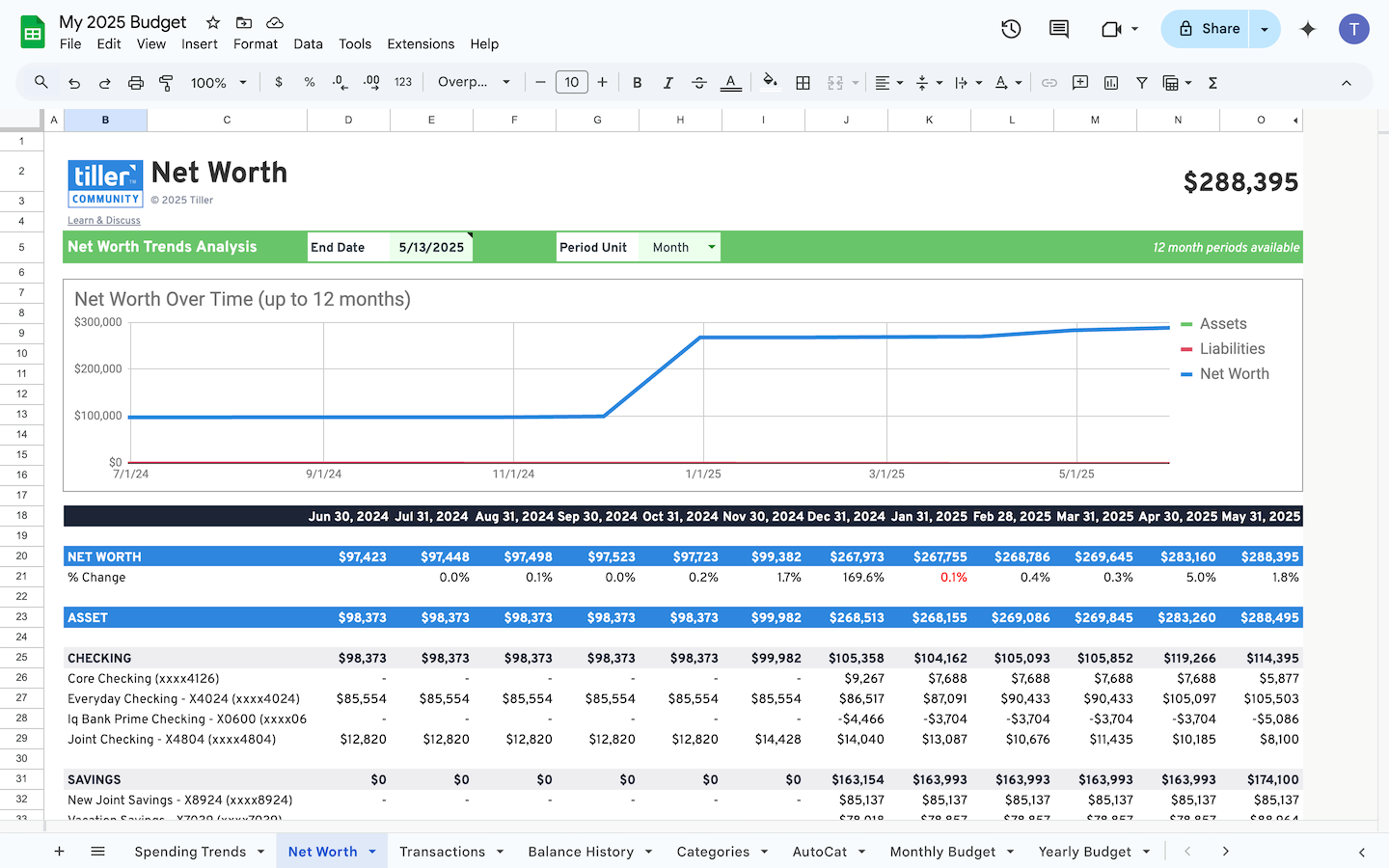
Net worth (monthly): Total assets minus total liabilities, recorded once per month. This is the single most important long-term financial metric — the number that tells you whether you’re building wealth or treading water. Start here if you’re tracking nothing else long-term.
Savings rate (monthly): What percentage of your income went to savings or investments this month? Track this month-over-month to see whether you’re maintaining, improving, or slipping. Even a rough calculation (savings dollars / total income) is useful.
Debt balances (monthly): Track each significant debt balance separately — mortgage, student loans, auto loan, credit cards. Watching balances decline over time is one of the most motivating things in personal finance. It also shows you the impact of extra payments, if you make them.
Total monthly income (monthly): Track your gross or net income each month. Over time, this shows income growth, side income contributions, and seasonal patterns. For variable earners (freelancers, commission earners, etc.), this data is especially valuable for cash flow planning.
Spending by category (quarterly or annually): Rather than analyzing category spending every month, pull it quarterly or at year-end. Category-level trends are more meaningful over longer periods — is dining spending gradually rising? Have healthcare costs increased year over year?
If all of this feels like too much to start, begin with just net worth and savings rate. Add other metrics once your tracking habit is established.
Setting up a long-term tracking spreadsheet
The simplest effective structure for a long-term tracking spreadsheet is one sheet with one row per month and one column per metric.
Example layout:
| Month | Net Worth | Total Savings | Total Debt | Savings Rate | Notes |
| Jan 2024 | $62,800 | $1,200 | $41,500 | 14% | Started tracking |
| Feb 2024 | $65,200 | $1,400 | $41,100 | 16% | |
| Mar 2024 | $68,300 | $1,600 | $40,700 | 18% | Got raise |
Keep a Notes column for anything worth recording, such as a job change, a large expense, a debt payoff, or a market event that affected your investment balance. This context will make the data more useful when you look back.
Where the data comes from: Each month, update the balances on your Accounts sheet (or pull them from Tiller’s Balance History), calculate totals, and enter a new row. The notes column takes 30 seconds. The whole entry takes five minutes.
If you don’t have historical data: Start from today. Record your current balances as Month 1. You can’t reconstruct the past, but you can begin building a forward-looking history. Within six months you’ll have a meaningful trend, and within a year you’ll have a genuinely useful long-term view.
Building trend charts and visualizations
The charts built from long-term data are the most motivating visualizations in personal finance because they allow you to see how your financial situation changes over time. Here are a few important ones to get you started.
Net worth over time: Select your Month and Net Worth columns, go to Insert → Chart, choose Line Chart. Google Sheets builds it automatically. As months accumulate, this line chart becomes the clearest possible answer to “Am I getting ahead?”
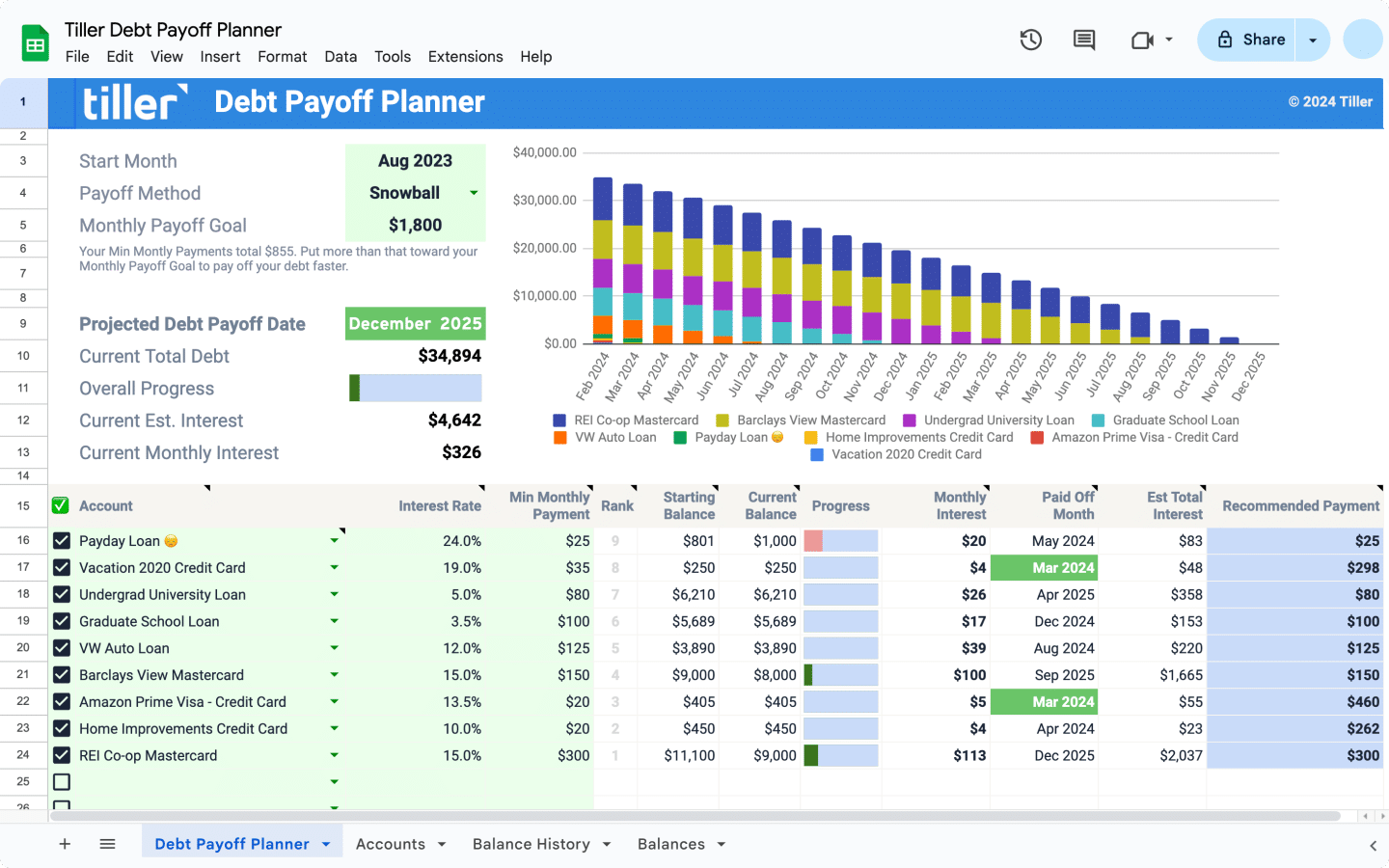
Debt payoff progress: Select Month and Total Debt columns, create a line chart. Watching the line move downward — especially after an accelerated payoff period — is visually satisfying in a way that looking at a single balance isn’t.
Savings rate trend: A bar chart of monthly savings rate across the year makes it easy to spot months where you saved more or less than usual. Combined with your Notes column, you can often explain exactly why — and figure out if you need to make any changes.
Keep your charts on a dedicated Dashboard sheet so they’re easy to find. The dashboard should answer “How am I doing overall?” in under a minute — a quick scan, not a deep dive.
Connecting monthly data to long-term views
Compiling your monthly data is the key to long-term tracking. There are three ways to get this done.
The manual approach: At the end of each month, open your Accounts sheet, update each balance, and copy the summary numbers into a new row on your long-term tracker. Five minutes of work, once a month.
With formulas: Use cross-sheet cell references to pull month-end totals automatically. If your Budget sheet has a total monthly spending cell, reference it in your long-term tracker so it populates without copying.
With Tiller: Tiller’s Balance History sheet captures daily account balances for every connected account automatically. Instead of logging into each bank account to record your monthly balances, you can reference your Balance History data directly. All that’s left to do each month is verify the numbers that have been collecting themselves all along.
Combined with Tiller’s continuous transaction history, you end up with a complete multi-year financial record — transactions, balances, and trends — all in a single spreadsheet.
Maintaining your long-term tracker
The most important thing about long-term tracking is consistency. One row per month, every month. Even approximate numbers are valuable; rough numbers you maintain for two years beat precise ones you abandon tracking after four months.
Monthly ritual (5 minutes): Add or verify the current month’s row. Update balances, record metrics, and add any notes.
Quarterly review (15 minutes): Look at 3-month and 6-month trends. Is your net worth growing at a pace you’re satisfied with? Are any metrics moving in the wrong direction for two or three months in a row?
Annual review (30 minutes): Year-over-year comparison. How much did net worth grow this year vs. last year? Is your savings rate trending up? Extend chart ranges to include the new year’s data. Set informal goals for the coming year based on the trajectory you’re on.
The annual review is where long-term tracking pays off most clearly. You have 12 months of real data (not projected numbers) to look at, and 12 months of future decisions to make with that context.
Frequently asked questions
What should I track in a long-term personal finance spreadsheet?
The four most valuable metrics to track monthly are net worth (total assets minus total liabilities), savings rate (percentage of monthly income going to savings or investments), total debt balance (to watch paydown progress), and monthly income. Spending by category can be tracked quarterly or annually — category-level trends are more meaningful over longer periods. Start with just net worth and savings rate if the full list feels like too much.
How do I see year-over-year financial progress in Google Sheets or Microsoft Excel?
Create a summary sheet with one row per month and columns for each metric you’re tracking. After a year, add a comparison column that references the same month from the prior year. A line chart of your full month history gives you an immediate visual of the trajectory. With 24+ months of data, you can calculate year-over-year percentage changes to see whether your rate of progress is accelerating or slowing.
How do I start long-term tracking if I have no historical financial data?
Start from today. Record your current net worth, current account balances, and current income as your Month 1 baseline. You can’t reconstruct the past, but you can begin building a forward-looking history from this point. Within six months you’ll be able to see meaningful trends, and within 12 months you’ll have a valuable long-term view. The hardest part is starting.
How does Tiller help with long-term financial tracking?
Tiller’s Balance History sheet captures daily balances for every connected account automatically — which is the raw data source for long-term tracking. Instead of logging in to each account monthly to record balances manually, you can reference your Balance History data directly. Combined with your transaction history (which Tiller also maintains continuously), you end up with a complete multi-year financial record in your spreadsheet.