Budgeting apps and spreadsheets solve the same problem — keeping track of where your money goes. But they solve that problem in fundamentally different ways. Which one is the right choice depends on how you like to work, how much control you want, and how much setup you’re willing to do.
What each approach actually is
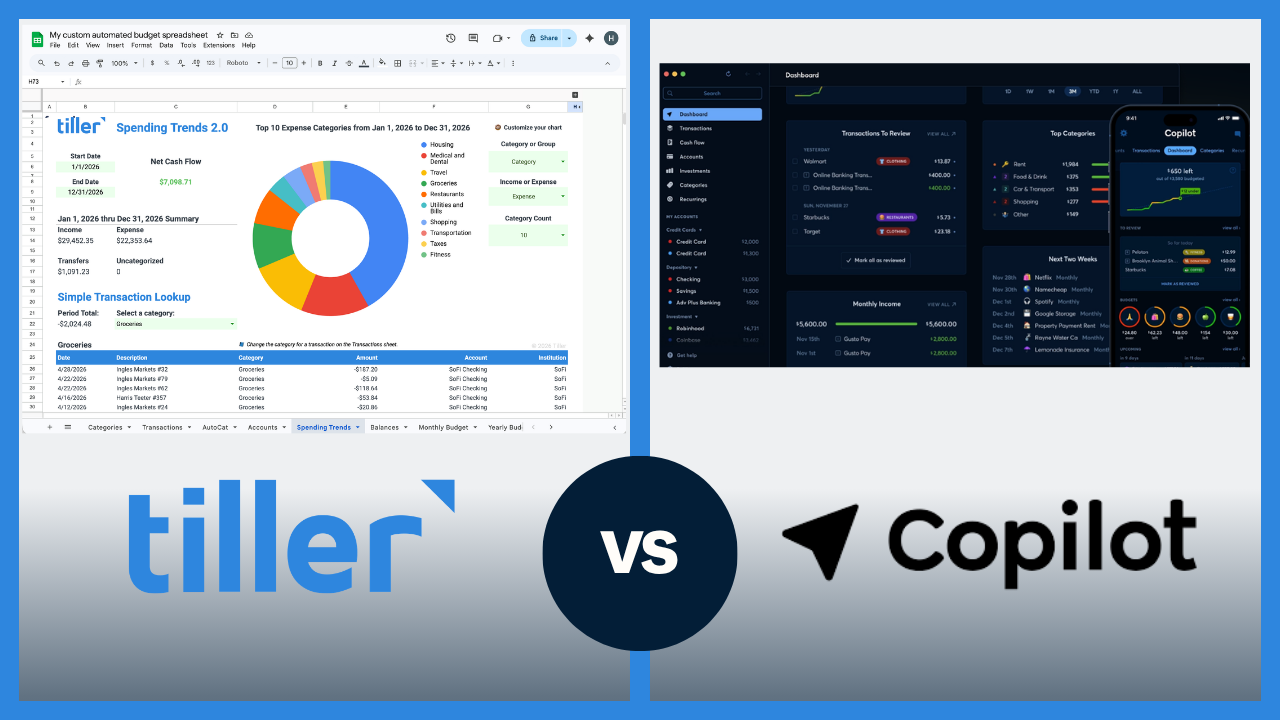
Budgeting apps: Software products (YNAB, Monarch, Copilot Money, Rocket Money, etc.) that connect to your bank accounts, automatically import transactions, categorize spending, and present your financial picture through a pre-designed interface. Setup is fast because the system is built for you, and you work within the app’s structure.
Spreadsheet budgeting: Managing your finances in Google Sheets or Microsoft Excel — either with a pre-built template or a system you design yourself. A tool like Tiller can automate importing transactions into your spreadsheet, or you can enter them manually. The structure is entirely yours to define.
Both approaches can connect to your bank. The core difference is where the data lives and who controls the structure around it.
Side-by-side comparison
| Spreadsheet Budgeting | Budgeting Apps | |
| Setup time | Moderate (30–60 min with a template) | Fast (15–20 min) |
| Transaction import | Automatic with Tiller; manual otherwise | Automatic |
| Customization | Complete — you build the system | Limited — you work within the app’s structure |
| Data ownership | You own the file permanently | Stored in the app’s platform |
| Cost | Free (manual) or $99/year (Tiller) | $72–$109/year typically |
| Mobile experience | Via Console and Google Sheets / Excel apps | Native app |
| Collaboration | Google Sheets / Excel sharing — flexible | Varies by app; some have household plans |
| Learning curve | Moderate — spreadsheet comfort helps | Low — guided setup |
| Longevity risk | None — file is yours forever | Platform dependency (apps can shut down) |
| Customization ceiling | None | Moderate — varies by app |
Where budgeting apps win
Apps are the stronger choice in several situations:
- Speed of setup: Apps are faster to get running. Connect accounts, let auto-categorization do its work, and you have a functional financial overview in 15–20 minutes. A spreadsheet system — even starting from a good template — requires more deliberate configuration.
- Mobile experience: Purpose-built iOS and Android apps from YNAB, Monarch, and Copilot Money are polished and fast. Checking your budget on the go, adding a transaction from your phone, or getting a spending alert is smoother in a native app than in Google Sheets’ or Excel’s mobile interface.
- Guided methodology: YNAB in particular builds a specific budgeting approach (zero-based budgeting) directly into the product. For people who want a proven method handed to them rather than building their own system, apps can provide that scaffolding.
- Lower ongoing friction for passive users: If you want your finances tracked in the background with minimal weekly engagement, an app handles that better. Spreadsheet budgeting rewards regular check-ins; app-based tools can function reasonably well with less active involvement.
Where spreadsheet budgeting wins
On the other hand, there are several situations where spreadsheets are a better choice:
- Customization without a ceiling: Apps let you rename categories and adjust budget amounts. Spreadsheets let you design (or redesign) the entire system — add columns, build formulas, create custom dashboards, track whatever metrics matter to you. There’s no feature request to submit, no waiting for a product update.
- You own the data permanently: Your spreadsheet is a file on your Google Drive, OneDrive, or computer. If you stop paying for any tool associated with it, the file and all your history stay exactly where they are. App-based budgets depend on the platform staying live. Mint’s shutdown in 2024 reminded many people that financial data on someone else’s platform isn’t guaranteed to be accessible forever.
- Cost advantage for serious budgeters: At the high end of the app market ($99–$109/year for YNAB or Monarch), spreadsheet budgeting with Tiller ($99/year) is cheaper. At the low end, a free spreadsheet template costs nothing.
- Grows with your life without forcing workarounds: Got married and need to merge two financial systems? Bought a house and want to track the mortgage principal separately? A spreadsheet adapts immediately — you add a sheet or a column. Apps adapt when their product teams ship updates.
The manual entry question
The historical knock on spreadsheet budgeting was manual transaction entry: downloading CSVs from five bank accounts, cleaning formatting, and pasting them into your master spreadsheet. For most people, this friction is where spreadsheet systems break down. Apps solved this with automatic bank syncing, which was historically a significant advantage.
That advantage has narrowed. Tiller connects to 21,000+ financial institutions and delivers daily transactions directly to Google Sheets or Excel. This is the same automatic import that apps offer, but into a spreadsheet you own. Manual entry is now a choice, not a requirement. For people who want the flexibility of a spreadsheet without the data entry work, Tiller closes this gap completely.
Cost comparison — what you’re actually paying
- Free spreadsheet templates: $0. Google Sheets built-in templates, Microsoft’s templates, Vertex42, and Tiller’s free downloads. Full manual entry is required.
- Tiller (automated spreadsheet): $99/year. Automatic bank sync into Google Sheets or Excel. 30-day free trial.
- Simplifi: $71.88/year. App-based, good for a passive overview.
- Monarch: ~$99.99/year. Full-featured app, strong for couples.
- YNAB: $109/year. Zero-based budgeting methodology built in.
- Copilot Money: ~$95/year. Apple-only, AI-assisted, excellent design.
Cost alone rarely determines the right choice. The more important question is which tool you’ll actually use consistently.
Which approach is right for you?
A budgeting app is probably the better fit if:
- You want the fastest possible setup with minimal configuration.
- You primarily track finances on your phone and want a polished native app experience.
- You want a proven budgeting methodology built in (especially YNAB’s zero-based approach).
- You prefer a more passive financial overview where you set it up and check in occasionally.
- You have no interest in working with spreadsheets.
A spreadsheet is probably the better fit if:
- You want a financial system built around your specific situation, not a generic template.
- You’re comfortable in Google Sheets or Excel or willing to learn the basics.
- You want your financial data in a file you own permanently.
- You’ve used a budgeting app and found the fixed structure limiting.
- You’re a serious, engaged budgeter who reviews transactions regularly and wants complete visibility.
- You want to build custom reports, track net worth, or do financial analysis beyond basic budgeting.
If a spreadsheet sounds like the right approach, the next question is how to make it practical. Tiller handles the data layer — automatic bank imports into Google Sheets or Excel — so you get the flexibility of a spreadsheet without the manual entry work.
The bottom line
Both approaches work. They suit different people, and the choice comes down to how you want to engage with your finances. Apps offer speed, polish, and low maintenance. Spreadsheets offer control, permanence, and flexibility. If spreadsheets appeal to you — especially the idea of owning your data and building your own system — Tiller is the practical way to get there without the burden of manual entry.
Frequently asked questions
Q: Is it better to use a spreadsheet or a budgeting app for personal finance?
Neither is universally better. Instead, the right choice depends on how you want to engage with your finances. Budgeting apps are faster to set up, easier to use on a phone, and require no spreadsheet knowledge. Spreadsheets offer greater flexibility, full data ownership, and no ceiling on customization, but require more setup. People who track their finances seriously over many years tend to migrate toward spreadsheets; people who want easy passive oversight often prefer apps.
Q: What are the main advantages of budgeting in a spreadsheet?
The main advantages are customization, data ownership, and longevity. A spreadsheet can be structured exactly how your financial situation requires. Your data lives in a file you own permanently, regardless of what any tool or platform does. And a spreadsheet system grows with your life without waiting for a product update. The main historical downside was manual transaction entry, but tools like Tiller now address this with automatic bank imports into Google Sheets and Excel.
Q: What are the main advantages of using a budgeting app?
The main advantages are setup speed, mobile experience, and low friction. Budgeting apps connect to your accounts, auto-categorize transactions, and provide a clear financial overview in just 15–20 minutes of setup. Some apps (particularly YNAB) also build a specific, proven budgeting methodology directly into the product. The tradeoffs are less customization and data that lives inside the app’s platform rather than in a file you control.
Q: Do I have to enter transactions manually if I use a spreadsheet?
Not necessarily. Free spreadsheet templates require manual entry. Tiller eliminates this by connecting directly to your bank accounts (21,000+ institutions) and automatically delivering daily transactions to your Google Sheets or Excel file. Manual entry is now a choice, not a requirement.
Q: What happened to Mint, and does it affect this choice?
Mint shut down in March 2024 after Intuit discontinued it. Millions of users lost access to years of financial history stored inside the platform. This made data ownership a more conscious consideration: financial data stored inside a third-party app is subject to that company’s decisions about pricing, features, and continuity. A spreadsheet budget stored in your own Google Drive or OneDrive isn’t subject to any of that.
Q: How much does spreadsheet budgeting cost compared to budgeting apps?
Free spreadsheet templates cost nothing but require manual transaction entry. Tiller, which automates bank imports into Google Sheets or Excel, costs $99/year. Popular budgeting apps range from $71.88/year (Simplifi) to $109/year (YNAB), with Monarch and Copilot Money at approximately $95–99/year.