Templates can help you get a big head start on creating a personal finance spreadsheet that works for you. But sorting through the thousands of options can be overwhelming. Not all spreadsheets are of the same quality, either.
In this guide, we’ll cover the best templates across several categories, including budgeting, debt payoff, net worth tracking, investment monitoring, retirement planning, cash flow, and tax preparation. We’ll look at what each template does well and who it works best for.
How to choose the right template
The following three questions will help you narrow your template options.
1. Google Sheets or Microsoft Excel?
Most templates in this library are available for both platforms. Tiller supports both. If you’re flexible on platform, Google Sheets is generally the better-supported option for free personal finance templates.
2. Manual or automated?
Some templates will be better suited for automated data, meaning services like Tiller can connect to your bank accounts and update your spreadsheets with up-to-date transaction data. Other templates might be manual or not work well with automated data entry. Manual entry works well at low volume or for occasional use. Automated is better for consistent daily or weekly tracking across multiple accounts.
3. Single-purpose or complete system?
Single-purpose templates solve one problem. Example templates are a debt snowball calculator, a net worth tracker, or a retirement planner. Complete systems connect multiple components within a single workbook. If you’re just starting out, a single-purpose template is usually the right entry point. Once you understand what you want to track, a complete system is more efficient.
How to evaluate any personal finance template
Before downloading or copying any template, check for these five things.
1. A data layer separated from the summary layer. The best templates store transactions in one sheet and calculate summaries in another. Templates that mix raw data and summary calculations break easily when you add rows.
2. SUMIF or QUERY-based formulas. Templates that rely on manual cell references (=B5+B6+B7) break when you insert or delete rows. Formulas that reference named ranges or use SUMIF to pull totals by category are more durable because they keep working as you add more data.
3. Categories you will use. A template with 30 preset categories that don’t match your spending is worse than one with 12 that do. Look for templates with customizable category lists or clear instructions for modifying them.
4. A clear update workflow. Understand how data gets into the template before you commit to it. Manual entry works when the process is simple and fast, but it tends to fail when it requires significant formatting each time.
5. Active maintenance. For community-built templates, check when the template was last updated. Templates abandoned years ago may have formulas that don’t work in current versions of Google Sheets or Excel.
Budgeting templates
Budgeting templates are the most common type of spreadsheet. They’re also the most important to get right. A budget template should show planned and actual spending by category, with a difference column that makes overspending visible.
Best free monthly budget templates
Google Sheets’ built-in Monthly Budget template or Microsoft Excel’s monthly budget template are the fastest starting points. They’re accessible from each app’s template gallery. Vertex42’s free monthly budget spreadsheet is more polished with better formatting and more category depth. Tiller’s free monthly budget template is the strongest free option if you think you’ll eventually want automation; it’s built to work with Tiller’s automated bank feed, but it also functions as a standalone manual template.
Best for specific budgeting methods
There are many specialized budgeting methods. Here are a few of the best templates if you’re following a specific plan:
- Zero-based budgeting: Tiller’s zero-based budget template or Tiller-community-built YNAB-style spreadsheets.
- Envelope budgeting: Aspire Budgeting (free, Google Sheets, active community).
- 50/30/20 rule: NerdWallet’s budget worksheet or Google’s calculator template.
- Weekly budgeting: templates structured around pay periods rather than calendar months.
Best automated option
Tiller’s Foundation Template includes a pre-built monthly budget sheet that syncs with daily transaction imports from all your connected accounts. Your budget vs. actual view updates automatically as new transactions arrive.
Debt payoff templates
Debt payoff templates range from simple single-loan calculators to complete multi-debt management systems. When selecting a template, you’ll want to consider how many debts you’re managing and what payoff strategy you’re using.
For a single loan: A loan amortization calculator shows your payoff timeline, monthly payment breakdown, and total interest cost. Google Sheets and Excel both include basic versions in their template galleries.
For multiple debts — debt snowball method: Vertex42’s Debt Reduction Calculator handles both snowball and avalanche methods with clear amortization schedules. Tiller’s Community Debt Snowball Spreadsheet and Payoff Planner uses Tiller’s automated transaction data.
For multiple debts — debt avalanche method: Tiller’s Debt Avalanche Planner Spreadsheet is a focused, free template for the avalanche method, with a payoff timeline and interest-savings calculations.
For a complete debt management system: The Debt Payoff Spreadsheet Toolkit covers your full debt picture in one coordinated system. It includes a debt inventory, a strategy calculator, a payment tracker, and a progress dashboard.
Best automated option: Tiller’s Debt Payoff Planner connects to your loan and credit card accounts and updates balances daily. It supports both snowball and avalanche strategies.
Net worth and financial tracking templates
Net worth templates show everything you own minus everything you owe to give you a single-line assessment of your finances. Net worth templates also track how that number changes over time. While budgeting gives you a month-to-month view, net worth trackers show whether your budget is helping you make financial progress over months and years.
Best free net worth template: Several Tiller-community-built Google Sheets and Excel net worth trackers include asset and liability sections, monthly snapshot tracking, and trend charts. Tiller’s Community Net Worth Spreadsheet is the strongest free option for Google Sheets.
Best investment tracker: Several free templates use Google Sheets’ GOOGLEFINANCE function for real-time stock and ETF pricing. Tiller’s free investment spreadsheet collection covers portfolio tracking, asset allocation, and dividend monitoring.
Best retirement planning template: Tiller’s Community Retirement Planner models savings rates, investment returns, and retirement age scenarios. For standalone projection modeling, several free calculators are available from Vertex42 and personal finance bloggers.
Best cash flow template: Cash flow templates are about timing. They show when income arrives, when bills are due, and whether you’ll have enough cash at every point in the month. For example, will your monthly income arrive in time to let you pay your rent on time? These templates are especially helpful for variable-income earners and people who’ve experienced mid-month cash shortfalls despite a budget that balances at the end of the month.
Best automated option: Tiller’s Foundation Template includes a built-in net worth tracker that syncs with daily account balance updates from bank, investment, and loan accounts.
Specialty and situational templates
Some financial situations don’t fit neatly into budgeting, debt, or net worth templates. Below are the most common specialty use cases.
Real estate investors: Templates for rental property income tracking, cash flow analysis, ROI calculation, and property comparison. Tiller’s free real estate spreadsheet collection covers residential and commercial investing, rental property income tracking, and home purchase decisions for Google Sheets and Excel.
Savings goal trackers: Templates for tracking progress toward specific financial goals, such as an emergency fund, vacation, home purchase, or education. A Tiller-community-built tracker visualizes savings progress against a target with timeline projections.
Tax preparation: Templates for tracking deductible expenses throughout the year, organizing income by source, estimating quarterly payments, and preparing a clean record for tax software or an accountant.
Couples and shared finances: Templates designed for two-income households with joint and individual expense tracking. Google Sheets’ and Excel’s sharing features make most templates usable for couples. Templates specifically built for joint finances include combined income, shared expense categories, and individual discretionary sections.
FIRE planning: Financial Independence / Retire Early calculators model savings rates, investment growth, withdrawal rates, and projected FI dates. Several Tiller-community-built Google Sheets FIRE calculators are available through Tiller’s community template library.
The complete automated system — Tiller’s Foundation Template
Many of the free templates in this library require you to import transaction data yourself. For occasional use or a single account, that’s manageable. But for consistent daily tracking across multiple accounts, manual entry often becomes too time-consuming to keep up with.
Tiller’s Foundation Template provides an automated option. It includes:
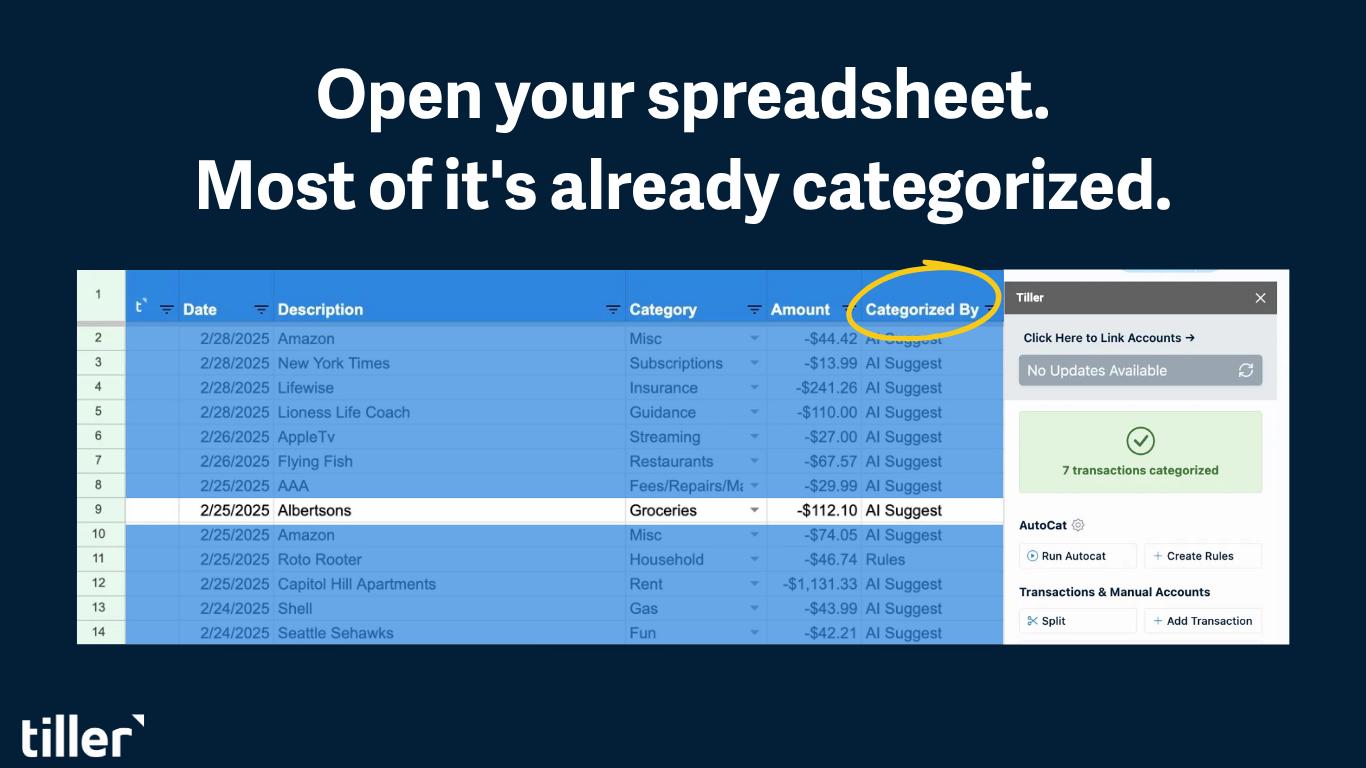
- Transactions sheet: every transaction from every connected account, automatically imported and categorized
- Budget sheet: planned vs. actual spending by category, updated daily from transaction data
- Net worth tracker: assets and liabilities with daily balance updates
- Account overview: current balances across all connected accounts
- Spending dashboards: category and trend analysis from real transaction data
Initial setup takes 30–45 minutes. You connect your accounts and configure categories, and then every component starts updating automatically. You can set up and modify rules in AutoCat to automatically categorize transactions as they come in. The Foundation Template is the starting point, but everything in it is fully customizable. The Tiller Community library adds 35+ additional templates to extend the system to meet specific needs.
At $99/year, Tiller costs less than most dedicated personal finance apps. In addition, your data lives in a spreadsheet you own permanently rather than inside a proprietary platform. And even if you stop using Tiller’s automated money feeds, you can continue to use your spreadsheets.
Frequently asked questions
Q: What is the best personal finance spreadsheet template?
The best template depends on what you’re trying to track and how much you want to automate. For a free monthly budget, Google’s built-in Monthly Budget, Microsoft’s personal monthly budget, or Tiller’s free template are strong starting points. For debt payoff, Vertex42’s Debt Reduction Calculator or Tiller’s Debt Avalanche Planner handle the most common use cases. For a complete automated system covering budgeting, net worth, and spending analysis, Tiller’s Foundation Template is the strongest option because it connects to your bank accounts and keeps every component up-to-date automatically.
Q: Are there free personal finance spreadsheet templates for Google Sheets and Excel?
Yes. For every category covered in this library, free templates are available for both Google Sheets and Excel. Google’s and Microsoft’s built-in template galleries, Vertex42, and Tiller’s own free template library all offer solid free options across budgeting, debt payoff, net worth tracking, and investment monitoring. Many personal finance bloggers also offer good templates. Free templates usually require manual data entry; Tiller’s subscription adds automated bank feeds to keep the templates up to date without manual work.
Q: What should a complete personal finance spreadsheet template include?
A complete system includes a transactions sheet (a running log of every income and expense entry, either manually entered or automatically imported), a budget sheet (planned spending by category compared to actual spending), a net worth tracker (total assets minus total liabilities, recorded monthly), and a summary or dashboard view that pulls key numbers together. Starting with just a transactions sheet and a budget sheet is fine. The other components can be added once the core system is running.
Q: How do I know if a personal finance template is well-built?
There are five things to check for: (1) a data layer separated from the summary layer, (2) SUMIF or QUERY-based formulas rather than manual cell references, (3) customizable categories, (4) a clear and sustainable tracking workflow, and (5) active maintenance. Templates that mix raw data and summary calculations in the same sheet or that rely on manual cell references tend to break when customized.
Q: What’s the difference between a free template and Tiller’s Foundation Template?
Free templates provide structure, but you usually have to enter every transaction yourself. Tiller’s Foundation Template includes the same structure plus an automated bank feed, so transactions from all your connected accounts flow into your spreadsheet every day without manual entry. The Foundation Template is free for 30 days; after that, Tiller costs $99/year. That’s less than most dedicated personal finance apps, with the added benefit that your data lives in a spreadsheet you own permanently.
Q: Can I use multiple personal finance templates in the same spreadsheet?
Yes. This is one of the advantages of spreadsheet-based finance. You can combine a budget sheet, a net worth tracker, a debt payoff planner, and a cash flow template in a single workbook, with all components referencing the same transaction data. The Complete Personal Finance System guide covers how to build a coordinated multi-sheet system. Tiller’s Foundation Template provides a pre-built version of this approach with automated data.